TL;DR. nginx shipped fixes for nginx2root (CVE-2026-123007 and four sibling RCEs) on 18 November. PHP shipped fixes for 17 CVEs, seven of them critical, on 19 November. On the evening of the 20th we patched our own production server.
- 43 containers checked in minutes, by asking each one which nginx and PHP it runs.
- 13 ran an old version. Only 6 were exposed: the PHP containers of three public web apps.
- Every fix came from an official image, verified in the registry before the download.
- The riskiest upgrade (an 8-release ERPNext jump) was rehearsed on a fork with real data first. The fork answered the one question the release notes could not.
- One disk filled up mid-download. Growing the volume online took 3.9 seconds, with no downtime.
What was disclosed
nginx2root is a set of five remote code execution bugs in open source nginx. The headline one, CVE-2026-123007, is an integer underflow in HTTP/2 flow control, scored 9.2 under CVSS 4.0. It affects every nginx from 1.9.5 (2015) to 1.31.8 that has HTTP/2 turned on. The other four need HTTP/3 behind a proxy, the mail proxy with auth_http, or the DNS resolver used together with mirror. Fixed releases: 1.31.9 (mainline) and 1.30.7 (stable). A public proof of concept appeared the same day.
The PHP release came a day later: 8.5.13, 8.4.28, 8.3.37 and 8.2.36. The worst bugs are in session handling and in the timezone cache, and they can end in code execution. A second group hits PHP-FPM only: request smuggling, an XSS on the status page and a local privilege escalation.
The server in this story is hostinger, the same production machine from our PocketOS test. It runs a mail server with webmail, Nextcloud, a marketing stack, ERPNext, a GitLab, an observability stack and a few demos. Each app lives in its own Rediacc repository: an encrypted volume with its own Docker daemon and its own private IP range.
Step 1: find what is vulnerable, then what is exposed
Image tags lie by omission. nextcloud:35-apache says nothing about the PHP inside, and a Debian package keeps reporting nginx/1.26.3 before and after a security fix. So instead of reading tags, we asked every running container directly.
for repo in nextcloud mail mautic erpnext gitlab marketing observability demo-stackoverflow; do
  rdc term connect "$repo@hostinger" -c 'for c in $(docker ps --format "{{.Names}}"); do
    echo "$c: $(docker exec "$c" sh -c "nginx -v 2>&1; php -v 2>/dev/null | head -1")"
  done'
done
rdc term connect <repo> opens a shell inside the repository’s own environment, with DOCKER_HOST already pointing at that repository’s Docker daemon. One loop covered the whole machine.
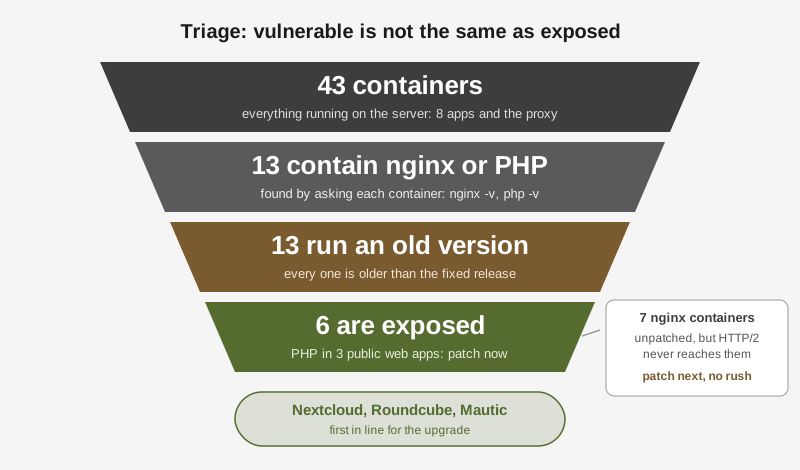
The result: 13 containers held nginx or PHP, and all 13 were older than the fix. That sounds like 13 emergencies. It was not.
Vulnerable means the code has the bug. Exposed means an attacker can actually reach the bug. The difference is the network path, and on this server every public request takes the same path.
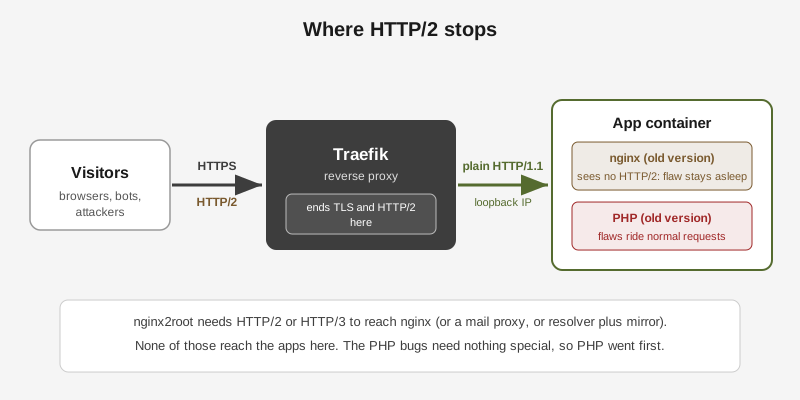
Traefik, the reverse proxy in front of every repository, ends TLS and HTTP/2. It talks to each app over plain HTTP/1.1 on a private loopback address. We checked the nginx configs inside the two apps that bundle nginx: no http2, no HTTP/3, no mirror, no mail proxy. So nginx2root had no way in.
The PHP bugs are different. They ride inside ordinary web requests. Nextcloud, Roundcube (the webmail) and Mautic all ran PHP behind Apache, all faced the internet, and all were one patch release behind. Those six containers went to the front of the line.
One detail made the PHP picture a bit better: all three apps run PHP as an Apache module, not as PHP-FPM, so the FPM-only bugs did not apply. The session and timezone bugs still did.
Step 2: find the official fix, and trust the registry over blog posts
Our first web searches returned confident, contradicting answers. One article said the official Nextcloud image still shipped an old PHP. Another said a third-party image had the fix. None quoted the image itself.
The image does not need to be downloaded to read what is inside. The registry serves each image’s config, and the official PHP-based images record PHP_VERSION in it.
curl -s "https://registry-1.docker.io/v2/library/nextcloud/blobs/<config-digest>" \
  -H "Authorization: Bearer $TOKEN" | jq -r '.config.Env[]' | grep PHP_VERSION
# PHP_VERSION=8.5.13
That gave a clear answer for each app within minutes:
| App | Running | Official fix | PHP inside the fix |
|---|---|---|---|
| Nextcloud | 35.0.2 | nextcloud:35.0.3-apache | 8.5.13 |
| Roundcube | 1.7.5 | roundcube/roundcubemail:1.7.6-apache | 8.4.28 |
| Mautic | 7.2.1 | mautic/mautic:7.2.2-20261119-apache | 8.3.37 |
| ERPNext | v16.52.1 | frappe/erpnext:v16.60.0 | (nginx: unknown) |
ERPNext was the odd one. Its nginx comes from Debian’s package, so the version string stays at 1.26.3 either way. Debian’s fixed build is 1.26.3-3+deb13u11, published on 19 November. The new ERPNext image was built that evening. Was the fix in it? The image config cannot tell. Only running the image can.
Step 3: rehearse the risky one on a fork
Patch releases like Roundcube 1.7.5 to 1.7.6 are low risk. ERPNext v16.52 to v16.60 is eight releases of database migrations on real accounting data. That one got a rehearsal.
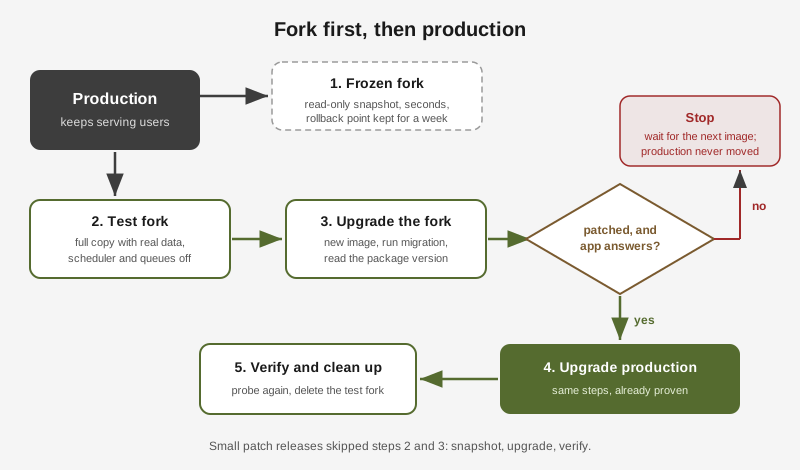
A Rediacc fork is a full copy of a repository, data included, made with a copy-on-write clone. It takes seconds whatever the size, and the copy gets its own Docker daemon, IP range and URL. Nothing in it can touch production.
rdc repo fork erpnext@hostinger --tag cve-test
rdc repo up erpnext:cve-test@hostinger --no-start   # mount only, start nothing yet
Before starting the fork, we edited its compose file: the new image tag, and the scheduler and both job queues parked under a disabled profile. A copy of real ERPNext data with a running scheduler would send real emails to real customers. With those off, the fork could serve pages and run migrations, and nothing else.
docker run --rm --entrypoint dpkg-query frappe/erpnext:v16.60.0 -W nginx
# nginx  1.26.3-3+deb13u11
There was the answer: the new image carried Debian’s patched nginx. Then the fork ran the full upgrade: bench --site all migrate finished cleanly on a copy of the production database, the app answered pong on its health endpoint, and the login page loaded on the fork’s own URL.
Had the image still carried the old package, the plan was simple: stop, delete the fork, and wait for the next build. Production would have stayed untouched instead of restarting for an upgrade that fixed nothing.
Step 4: production, one app at a time
Each app followed the same short routine:
- Snapshot.
rdc repo fork <app> --tag pre-cve-20261120 --immutablemakes a frozen, read-only copy. It cannot be mounted or started, so nothing can ever change it. - Pin the tag. Edit the compose file to the exact fixed tag.
- Pull, then deploy.
docker pull, thenrdc repo up <app> -y. - Run the app’s own upgrade step where it has one.
- Verify from inside (version, migrations) and from outside (the public URL).
| App | What happened | Containers back up |
|---|---|---|
| Nextcloud | Image entrypoint ran occ upgrade 35.0.2 to 35.0.3, about a minute in maintenance mode | 66 s |
| Roundcube | Plain image swap, schema check found nothing to do | 24 s |
| Mautic | Disk full on the first pull (below), then doctrine:migrations:migrate | 6 s |
| ERPNext | Same steps as the rehearsal, scheduler kept on, bench migrate exit code 0 | 17 s |
The final probe showed PHP 8.5.13, 8.4.28 and 8.3.37 in every PHP container, nginx deb13u11 in ERPNext, and all 43 containers running with no failing health check.
What went wrong
A floating tag hid a stale image. Nextcloud was on nextcloud:35-apache. That tag already pointed at the fixed image, but docker compose up -d does not pull an image it already has, so the server would have kept the old PHP forever. Pinning 35.0.3-apache makes the running version visible in the compose file and forces a real change on every upgrade.
A disk filled up mid-download. The Mautic image is 2.1 GB, and its repository had 1.4 GB free. The pull failed with no space left on device before touching the running containers. The fix was one command, done with Mautic still serving traffic:
rdc repo expand mautic@hostinger --size 12G
# Repository expanded (3.9s)
The volume grew from 8 GB to 12 GB online, and the pull went through. The machine’s size policy can now grow a repository automatically before it fills up.
The frozen snapshots were never used. Every upgrade worked, so the four pre-cve copies just sat there. That is the point of a safety net, but two honest notes. They were taken while the apps were running, so the database files inside are crash-consistent, the same state as after a power cut, not a clean shutdown. And a rollback that has never been rehearsed is a plan, not a guarantee. Next time, one restore gets tested while the snapshot is still fresh.
One app has no fixed release yet. A second app bundles its own nginx inside the vendor image, and that vendor has not shipped nginx 1.31.9 yet. The traffic path above keeps HTTP/2 away from it, so it waits for the vendor’s release instead of a hand-built image.
The choices, and why
| Option we had | What we chose | Why |
|---|---|---|
| Turn off HTTP/2 as a quick mitigation | Patch with new images | HTTP/2 already stopped at Traefik, so the mitigation added nothing. Patching removes the bug instead of hiding it. |
| Trust the version string | Check the package inside the image | Debian backports fixes without changing nginx -v. Only dpkg-query shows the real build. |
| Trust articles about which image is fixed | Read the image config in the registry | The articles disagreed. The registry is the source. |
Floating tags like 35-apache | Exact tags like 35.0.3-apache | A floating tag can point at the fix while the server keeps running the old image. |
| Upgrade in place, roll back if it breaks | Fork first for big jumps, snapshot first for small ones | A fork rehearsal costs seconds and finds the problem before users do. A full rehearsal for a one-step patch release is overkill. |
Split traffic with a canary (rdc repo canary) | Rehearse on a fork | A canary runs the new version on live data, which suits apps with backward-compatible schemas. An 8-release migration is not that. |
| Clean up the full disk by hand | Grow the volume online | Deleting files under Docker’s data folder is risky. Growing is one command and needs no restart. |
The checklist we keep
- Ask every container what it runs. Do not read tags.
- Separate vulnerable from exposed by following the real network path.
- Patch the exposed ones today, the rest this week.
- Read the fix from the registry, not from articles.
- For a package-based fix, check the package build inside the image.
- Snapshot before every change. Rehearse on a fork when the upgrade migrates data.
- Pin exact tags.
- Verify from inside and from outside, then clean up the forks.
The whole run, from reading the advisories to the last verification, was driven by an AI agent (Claude Code) working through rdc, with production access granted by the operator before the session started. The fork-first routine is what made that comfortable: the agent did its experiments on copies, and production only ever saw steps that had already worked.