
Authentication
Rediacc supports multiple authentication methods:
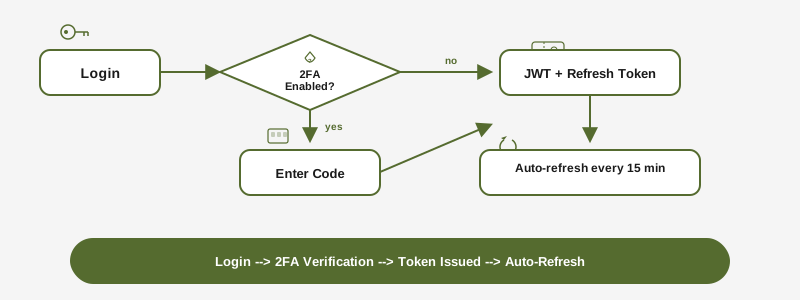
- Password: Traditional email + password login
- Magic Link: Passwordless login via email link (15-minute expiry)
- Two-Factor Authentication (2FA): TOTP-based with backup codes
When 2FA is enabled, login requires both your password (or magic link) and a 6-digit TOTP code.
API Tokens
API tokens authenticate machine-to-machine operations (CLI license activation, status checks).
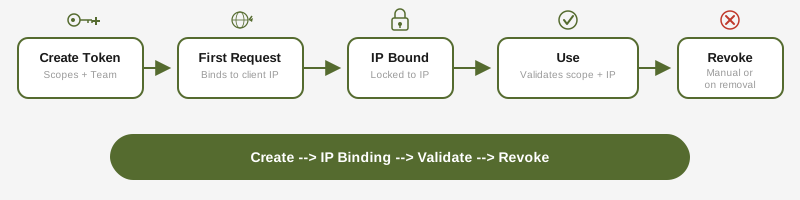
Scopes:
license:read— Query subscription and license statuslicense:activate— Activate machines and issue repository licensessubscription:read— Read subscription details
Security features:
- IP binding: a token is tied to the IP address of its first request; a new address needs a TOTP check or a new login (see below)
- Team scoping: tokens can be restricted to a specific team
- Auto-revocation: tokens are revoked when the creator is removed from the organization
Creating a token:
# Via the portal: API Tokens > Create
# Token value is shown once -- save it securely
When the IP address changes
A token bound to one IP address is refused from any other, for example after an ISP assigns a new address. The CLI handles the move:
- Interactive terminal, 2FA on: the CLI asks for the 6-digit code from the authenticator app, moves the token to the new address, and runs the command again. Backup codes are not accepted for a move.
- Scripts and CI (no terminal): the command fails and names both fixes: run any
rdccommand once in an interactive terminal (for examplerdc subscription status) and enter the code, or runrdc subscription login. - 2FA off: the token cannot be moved.
rdc subscription loginissues a new one, and with 2FA on, the next move needs only a code. - Wrong codes: 5 wrong codes within 15 minutes lock the move, first for 5 minutes and then twice as long each time, up to 1 hour. After 4 locks, moving is disabled for that token until the next
rdc subscription login. - Executor tokens with
unboundorcloudflareIP binding are not affected.
Each move appears in the portal activity log with the old and the new address.
Device Code Flow
The CLI can authenticate on headless machines using the device code flow:
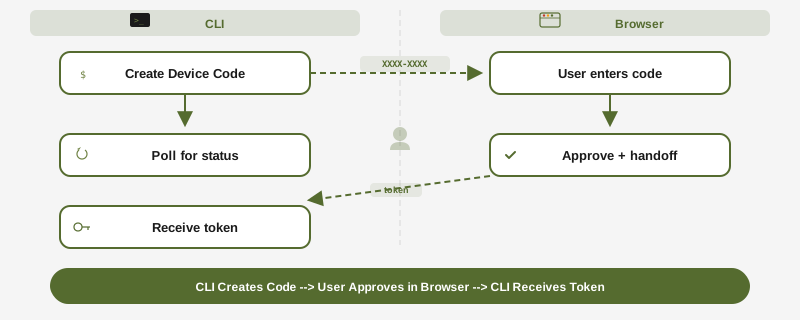
rdc subscription login
# Displays: Enter code XXXX-XXXX-XX at https://www.rediacc.com/account/authorize
# After approval, CLI receives credentials automaticallyLinking a config to Config Storage uses a separate request that goes through the account server as well. It is bound to the account the CLI is signed in as, the link keeps its secrets after the # so they stay out of server logs, and the user types a pairing code from the terminal on the approval page. The request expires after 10 minutes.
Config Storage
For encrypted, server-synced configuration, see Config Storage for the full guide. Config storage uses:
- Zero-knowledge encryption (server never sees plaintext)
- Passkey-based key derivation (WebAuthn + PRF)
- Rotating tokens with per-request rotation
Session Security
| Token Type | Lifetime | Storage | Refresh |
|---|---|---|---|
| Access Token (JWT) | 15 minutes | HttpOnly cookie | Auto via refresh token |
| Refresh Token | 7 days | HttpOnly cookie | Rotated on each use |
| Elevated Session | 10 minutes | Server-side | Triggered by re-authentication |
Elevated sessions are required for sensitive operations: password changes, email changes, 2FA setup, ownership transfers, and destructive admin actions.
Permission Model
Rediacc uses three independent permission layers:
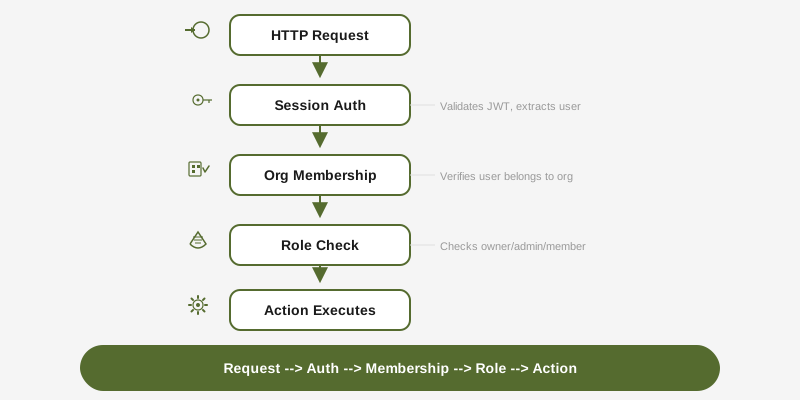
Layer 1: System Role — Determines access to system administration endpoints.
Layer 2: Organization Role — Controls what a user can do within their organization (owner, admin, member).
Layer 3: Team Role — Scopes access to specific team resources (team_admin, member). Organization owners and admins bypass team role checks.
Every API request passes through all applicable layers in sequence. A request to a team-scoped endpoint must satisfy session auth, org membership, and team access.
Update Channels
The CLI supports two release channels:
- stable (default): Promoted from edge after a 7-day soak; choose this for a conservative upgrade cadence
- edge: Continuously deployed production, updated on every merge to main
rdc update --channel edge      # Switch to edge
rdc update --channel stable    # Switch back to stable
rdc update --status            # Show current channel
CLI Security Posture for AI Agents
Coding agents invoking rdc are a real threat surface, so we treat them as a separate principal. Every rdc invocation is classified at startup as human or agent based on environment signals (CLAUDECODE, GEMINI_CLI, COPILOT_CLI, CURSOR_TRACE_ID, REDIACC_AGENT) plus a Linux /proc ancestry walk. Detection is best-effort. A determined wrapper can spoof env vars, which is why ancestry matters. Agents get a reduced permission set: sensitive config mutations require the knowledge-gate (--current <old>), the interactive editor is refused without an ancestry-verified REDIACC_ALLOW_CONFIG_EDIT override, and --reveal on any display command is blocked. Every decision (allow, refuse, or grant --reveal) writes one hash-chained JSONL line to ~/.config/rediacc/audit.log.jsonl. Run rdc config audit verify to check chain integrity.
See AI Agent Safety & Guardrails for the full matrix of what agents can and cannot do, worked examples of the knowledge-gate, and scope-override mechanics.