
Repositories
A repository is a LUKS-encrypted disk image on a remote server. When mounted, it provides:
- An isolated filesystem for your application data
- A dedicated Docker daemon (separate from the host’s Docker)
- Unique loopback IPs for each service within a /26 subnet
Create a Repository
rdc repo create my-app -m server-1 --size 10G| Option | Required | Description |
|---|---|---|
-m, --machine <name> | Yes | Target machine where the repository will be created |
--size <size> | Yes | Size of the encrypted disk image (e.g., 5G, 10G, 50G) |
--skip-router-restart | No | Skip restarting the route server after the operation |
The output will show three auto-generated values:
- Repository GUID — A UUID that identifies the encrypted disk image on the server.
- Credential — A random passphrase used to encrypt/decrypt the LUKS volume.
- Network ID — An integer (starting at 2816, incrementing by 64) that determines the IP subnet for this repository’s services.
Store the credential securely. It is the encryption key for your repository. If lost, data cannot be recovered. The credential is stored in your local
config.jsonbut is not stored on the server.
Mount and Unmount
Mounting is part of the deploy step. repo up decrypts and mounts the repository before it runs the Rediaccfile, so there is no separate mount command. Use --no-start to mount and prepare the repository without running its up() steps, and repo down --unmount to close the encrypted volume again.
rdc repo up my-app --no-start     # Decrypt and mount, without starting services
rdc repo down my-app --unmount # Stop, unmount, and re-encrypt| Option | Description |
|---|---|
--checkpoint | On repo down: create a CRIU checkpoint before unmounting (for containers with rediacc.checkpoint=true label) |
--skip-router-restart | Skip restarting the route server after the operation |
Check Status
rdc repo status my-appList Repositories
rdc repo list -m server-1Type column and the state mirror
The output table includes a Type column with three values:
grand. A top-level repository registered in your local CLI config without a parent. The base case.fork. A copy-on-write fork of another repo. Identified either viagrandGuidin the local config or via the renet.interim/statemirror on the machine. Either source is authoritative; both should agree once the mirror is populated.unknown. Neither signal can classify the repo. Most often a pre-mirror legacy fork (created before the mirror code shipped and never re-mounted since), or a stalegrandwhose local-config entry was deleted by mistake. The CLI refuses to guess; the operator should run the mirror backfill or remove the directory if it’s genuinely orphaned.
The .interim/state/<guid>/.rediacc.json mirror is a small sidecar file written outside the LUKS-encrypted volume so backup tooling and repo list can read fork lineage without unlocking each image. It carries the same shape as the in-volume .rediacc.json (is_fork, grand_guid, name, etc.) and is refreshed on every Repository.SaveState. I.e. every mount and every state mutation. It’s the source of truth for fork detection in scheduled backups: an unmounted fork with a mirror that says is_fork: true is correctly skipped from cold and hot uploads.
For routine cleanup of unknown entries, see rdc machine prune --prune-unknown.
Resize
Set the repository to an exact size or expand by a given amount:
rdc repo resize my-app --size 20G  # Set to exact size
rdc repo expand my-app --size 5G # Add 5G to current sizeThe repository must be unmounted before resizing.
repo expandworks online. Resizing changes the repository’s maximum size; to give freed blocks back to the pool without changing the maximum, userepo triminstead.
Reclaim Space (trim)
Deleting files inside a repository frees space for that repository, and repo trim returns those freed blocks to the shared datastore pool. It runs online with zero downtime:
rdc repo trim -m server-1                       # Trim every mounted repository plus the datastore
rdc repo trim my-app                            # Trim one repository
rdc repo trim -m server-1 --report-only         # Show reclaimable space without trimming
rdc repo trim -m server-1 --docker # Also clear stopped containers, dangling images, and build cache firstHow it works: repository images are sparse files, and the encrypted volume passes discards through. A trim tells the filesystem inside the repository to release every unused block, which punches holes in the backing image and shrinks the pool usage immediately.
Notes:
- The filesystem trim is skipped and reported for repositories under an active backup, because the backup snapshot still references the blocks, so punching holes would not free pool space. The
--dockerreclaim is not affected and still runs (see below). - Running trim twice in a row reports 0 bytes the second time. The filesystem remembers which block groups were already trimmed; this is expected, not a failure.
--dockernever removes tagged images, only dangling ones, stopped containers, and the build cache. Add--docker-volumesto also remove unused volumes (this deletes data; CLI only). Unlike the filesystem trim,--dockerreclaim runs even while a backup is in progress, so you can clear a wedged build cache without waiting for the backup window.
Automatic Size Policy
Instead of resizing by hand, let the machine manage repository sizes. A policy enables online auto-grow (the repository’s maximum size increases when it fills up) and scheduled trims. The machine applies policies every few minutes via the rediacc-storage-maintain systemd timer.
# Machine-wide default: trim every repository daily
rdc repo policy set -m server-1 --auto-trim true

# Per-repository: grow my-app automatically, up to a hard ceiling
rdc repo policy set my-app --auto-grow true --max-quota 50G

# Inspect the stored and effective policy
rdc repo policy get my-appPolicy fields:
| Field | Meaning | Default |
|---|---|---|
--auto-grow | Grow the repository online when its filesystem crosses the threshold | off |
--max-quota | Hard ceiling for auto-grow. Required: setting it is your explicit consent to over-provision the pool | none |
--grow-threshold | Filesystem used % that triggers a grow | 85 |
--grow-step | How much to add per grow: absolute (10G) or percent of the current size (20%) | 20% |
--auto-trim | Run scheduled trims | off |
--trim-interval | Minimum hours between automatic trims | 24 |
Guardrails: auto-grow refuses when the pool’s free space is below a reserve (10 GB or 5% of the pool, whichever is larger), waits at least 30 minutes between grows of the same repository, and never exceeds --max-quota. There is no automatic shrink: reducing a repository’s maximum size stays a manual, offline repo resize.
Per-repository settings override the machine-wide default. Repeated policy set calls change only the flags you pass.
Fork
Create a copy of an existing repository at its current state:
rdc repo fork my-app --tag stagingForks use the name:tag model: the resulting fork is named my-app:staging. This creates a new encrypted copy with its own GUID and network ID, while sharing the parent’s name. The fork shares the same LUKS credential as the parent.
Forks share the parent’s data via BTRFS reflink, including any credentials stored on disk. See What Rediacc does not isolate for the implications when those credentials authorize external services like Stripe, AWS, or Railway. To keep deploy-time credentials out of the fork’s reach, use per-repo secrets instead of baking values into
.envfiles inside the repo.
At fork creation, repo fork writes the state mirror sidecar at <datastore>/.interim/state/<fork-guid>/.rediacc.json immediately. Without unlocking the volume. So the new fork is correctly identified as is_fork: true from the moment of creation. This lets scheduled backups skip it (forks are excluded from the upload pipeline by default) even if it’s never mounted. When forking a fork, grand_guid chains correctly: the new fork’s mirror points at the original grand parent’s GUID, not at the intermediate fork.
Fork and start in one step
--up forks, mounts, and starts services in a single remote operation. Add --no-wait to get your terminal back as soon as the containers are started; health checks finish in the background, and the proxy retries until each service binds:
rdc repo fork my-app --tag staging --up
rdc repo fork my-app --tag scratch --up --no-waitIn our tests, a 128 GB repository forked and reached running services in about 57 seconds, and about 31 seconds with --no-wait. Such runs print a hint for checking progress: rdc machine status <machine> --containers.
Where the time goes
Runs longer than a few seconds end with a timing summary: a per-step breakdown, a waterfall showing what ran in parallel, and an attribution line separating the Rediacc pipeline from your services’ own startup:
Rediacc pipeline 19.2s (61%) · service startup 12.3s (39%)Service startup is your containers booting (images, init, health checks, as defined by the repository’s Rediaccfile), so it varies per app. The charts render on interactive terminals; set RDC_TIMING_CHART=1 to force them in piped output.
Git-like versioning
Forks can act as git commits. rdc repo commit freezes a working fork into an immutable, byte-stable commit; rdc repo branch names a line of history; rdc repo checkout reflink-clones a commit back into a writable fork; rdc repo log walks the parent chain; and rdc repo merge combines two lines without mutating a live repository in place. rdc repo fork --immutable produces a commit-equivalent base in a single step.
rdc repo commit my-app:work --message "schema migration applied"
rdc repo branch my-app:work --branch staging
rdc repo checkout staging --from my-app:work --tag staging-copySee the Git-like branching reference for the full command set, options, and worked examples.
Secrets
Per-repo secrets are deploy-time credentials injected into containers without being written to the encrypted repository image. They are kept on a separate plane from the repository’s data, so rdc repo fork does not propagate them. A fork starts with an empty secrets map and its containers boot identifying themselves as a different external principal than the parent.
Want a step-by-step walkthrough? See the Managing Secrets tutorial for the full set/list/deploy/verify/rotate cycle.
Write-only model (GitHub-style): get returns the SHA-256 digest only. The plaintext value is never returned to anyone, human or agent. If you forget what a value is, look it up in your password manager and rotate; you cannot read it back from Rediacc by design. This eliminates an entire class of leak: terminal recordings, shell history, accidental redirection, shoulder-surfing.
Two delivery modes:
env. The secret is exported asREDIACC_SECRET_<KEY>in the renet shell on the target machine. Reference it from yourdocker-compose.ymlvia${REDIACC_SECRET_<KEY>}interpolation. Visible inside the container’s environment, so use this for connection-string-shaped values that the application already expects in env.file. The secret is written to/var/run/rediacc/secrets/<networkID>/<KEY>on the host (tmpfs, never persisted). Reference it from your compose file via a top-levelsecrets:declaration withfile:source, plus a per-servicesecrets:list. Containers read from/run/secrets/<key>. Prefer this mode for anything sensitive. It never appears indocker inspector/proc/<pid>/environ.
# Set, list, get (digest only), unset
rdc repo secret set my-app --key STRIPE_LIVE_KEY --value sk_live_xxx --mode file --current ""
rdc repo secret set my-app --key DB_HOST         --value postgres.internal --mode env --current ""
rdc repo secret list my-app
rdc repo secret get  my-app --key DB_HOST    # → { key, mode, digest } — no value
rdc repo secret unset my-app --key STRIPE_LIVE_KEY --current sk_live_xxxSymmetric mutation gate. Both humans and agents need --current <previous-value> to overwrite or unset a secret (passwd-style precondition). For first-write of a new key, pass --current "" (empty). To rotate without verifying the prior value, pass --rotate-secret instead. This is loudly audited as a rotation. --current and --rotate-secret are mutually exclusive.
Pass --value - to read from stdin instead of argv (avoids shell-history exposure for one-shot writes).
In your docker-compose.yml:
services:
  api:
    image: myapp
    environment:
      DATABASE_HOST: ${REDIACC_SECRET_DB_HOST}
    secrets:
      - stripe_live_key

secrets:
  stripe_live_key:
    file: /var/run/rediacc/secrets/${REDIACC_NETWORK_ID}/STRIPE_LIVE_KEY
The lowercase service-side reference (stripe_live_key) is the in-container /run/secrets/<name> filename; the uppercase tail of the host path (STRIPE_LIVE_KEY) matches what you set with --key. ${REDIACC_NETWORK_ID} is interpolated by renet compose automatically.
Cross-repo isolation enforced: renet’s compose validator rejects
secrets: file:(andconfigs: file:, andenv_file:) paths that reference any other repo’s network ID. The literal${REDIACC_NETWORK_ID}token (or your own network’s int) is the only accepted form for/var/run/rediacc/secrets/...references. And--unsafedoes NOT override this check. The Landlock sandbox around the Rediaccfile bash subprocess also scopes filesystem access to your own network’s secrets directory only, so a maliciouscat /var/run/rediacc/secrets/<other>/Xfrom a Rediaccfile fails with EACCES at the kernel layer.
Forks:
rdc repo forkdoes not copy secrets. To use secrets in a fork, runrdc repo secret set <fork>on the fork explicitly. This is the load-bearing safety property. The fork’s containers should not be able to act as the production principal against external services.
Agents (Claude Code, Cursor, etc.):
repo secret listandrepo secret getare exposed as MCP tools (read-safe. Names + digests only, never values).setandunsetare CLI-only because the--current/--rotate-secretceremony requires human eyes-on; agents calling them via shell get the same gate as humans. When precondition fails, the JSON envelope contains a structurederrors[].next.options[].runfield. Agents should relay those commands verbatim to the user. See AI agent safety for the full model.
Validate
Check the filesystem integrity of a repository:
rdc repo admin validate my-appOwnership
Set file ownership within a repository to the universal user (UID 7111). This is typically needed after uploading files from your workstation, which arrive with your local UID.
rdc repo admin ownership my-appThe command automatically detects Docker container data directories (writable bind mounts) and excludes them. This prevents breaking containers that manage files with their own UIDs (e.g., MariaDB=999, www-data=33).
| Option | Description |
|---|---|
--uid <uid> | Set a custom UID instead of 7111 |
--skip-router-restart | Skip restarting the route server after the operation |
To force ownership on all files, including container data:
rdc repo admin ownership my-appSee the Migration Guide for a complete walkthrough of when and how to use ownership during project migration.
Template
Apply a template to initialize a repository with files:
rdc repo admin template apply my-app --template my-template --file ./my-template.tar.gzDelete
Permanently destroy a repository and all data inside it:
rdc repo delete my-appThis permanently destroys the encrypted disk image. This action cannot be undone.
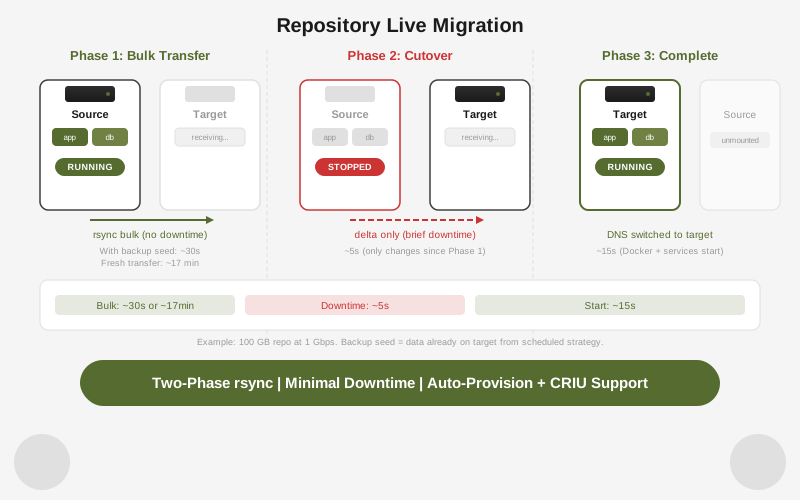
Migrate Repository
Live-migrate a repository from one machine to another. The only downtime is the final delta-sync phase: typically seconds to low minutes depending on write rate at cutover.
rdc repo migrate my-app@server-1 --to server-2| Option | Description |
|---|---|
--provision | Provision the repository on the target machine before migrating (creates LUKS image and registers config) |
--checkpoint | Create a CRIU checkpoint of running containers before cutover |
--bwlimit <kbps> | Limit rsync bandwidth in kilobytes per second |
--skip-dns | Skip updating DNS records after cutover |
Three-phase flow:
- Hot pre-copy - rsync transfers data while the repository stays running on the source. Large files are transferred before any downtime.
- Cutover - the repository is stopped on the source, a final rsync pass syncs remaining changes, and the repository starts on the target.
- Start on target - renet mounts and starts the repository on the target machine. DNS is updated unless
--skip-dnsis passed.
Push vs migrate:
repo push | repo migrate | |
|---|---|---|
| Operation | Copy | Move |
| Source after | Unchanged | Stopped |
| Downtime | None (copy only) | Brief cutover window |
| DNS update | No | Yes (unless --skip-dns) |
| Use case | Backup, staging clone | Machine replacement, server move |
Prune
After deleting repositories or recovering from failed operations, orphaned mount directories, lock files, and immovable markers may remain. Prune removes these safely:
# Preview what would be removed
rdc machine prune server-1 --dry-run

# Remove orphaned resources
rdc machine prune server-1Only resources with no matching repository image are affected. Non-empty mount directories are never removed.