
Architecture
So: rdc on your workstation, renet on your servers, communicating over SSH. Rediacc’s whole architecture rests on that split. This page covers how the two tools divide responsibilities, how adapter detection routes state, what the security model looks like, and how config is structured.
Full Stack Overview
Traffic flows from the internet through a reverse proxy, into isolated Docker daemons, each backed by encrypted storage:
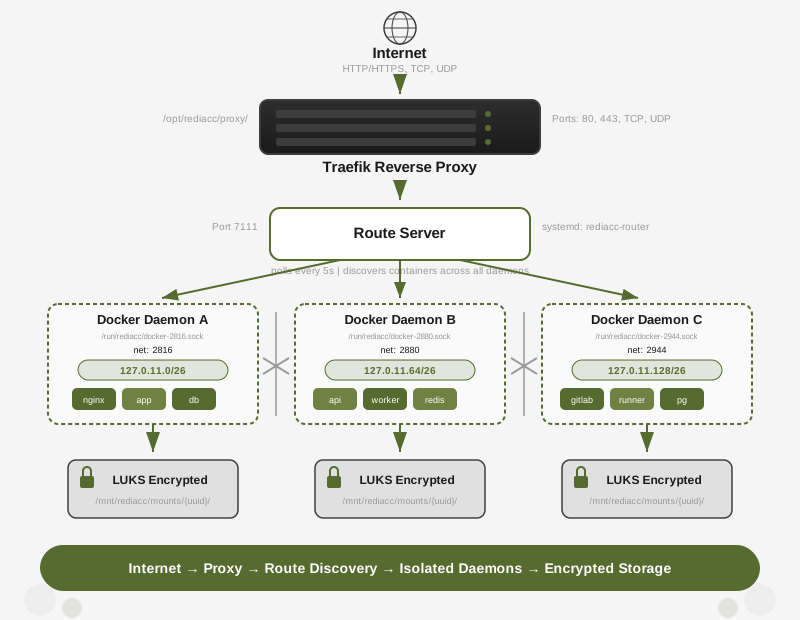
Each repository gets its own Docker daemon, loopback IP subnet (/26 = 64 IPs), and LUKS-encrypted BTRFS volume. The route server discovers running containers across all daemons and feeds routing configuration to Traefik.
Two-Tool Architecture
Rediacc uses two binaries that work together over SSH:
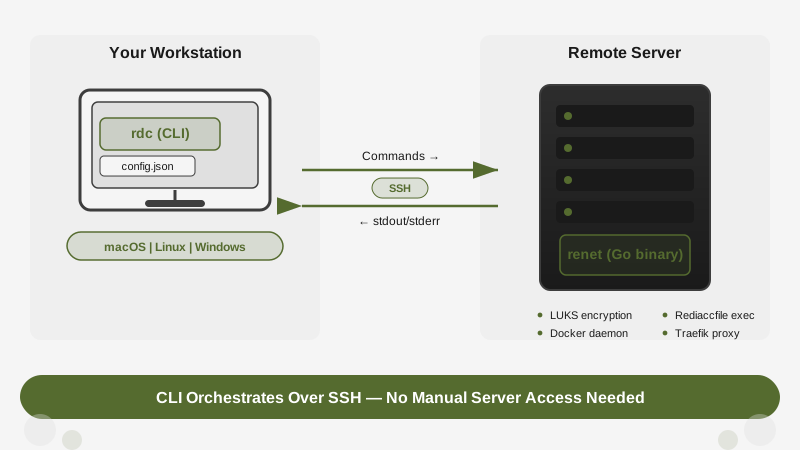
- rdc runs on your workstation (macOS, Linux, or Windows). It reads your local configuration, connects to remote machines over SSH, and invokes renet commands.
- renet runs on the remote server with root privileges. It manages LUKS-encrypted disk images, isolated Docker daemons, service orchestration, and reverse proxy configuration.
Every command you type locally translates to an SSH call that executes renet on the remote machine. You never need to SSH into servers manually.
For an operator-focused rule of thumb, see rdc vs renet. You can also use rdc ops to run a local VM cluster for testing, see Experimental VMs.
Config
All CLI state is stored in flat JSON config files under ~/.config/rediacc/.
All state lives in a config file on your workstation (e.g., ~/.config/rediacc/rediacc.json).
- Direct SSH connections to machines
- No external services required
- Default config is created automatically on first CLI use. Named configs are created with
rdc config init <name> - Optional encrypted config sync stores the same file in the config store, scoped per team
The rediacc User
When you run rdc machine setup, renet creates a system user called rediacc on the remote server:
- UID: 7111
- Shell:
/sbin/nologin(cannot log in via SSH) - Purpose: Owns repository files and runs Rediaccfile functions
The rediacc user cannot be accessed via SSH directly. Instead, rdc connects as the SSH user you configured (e.g., deploy), and renet executes repository operations via sudo -u rediacc /bin/sh -c '...'. This means:
- Your SSH user needs
sudoprivileges - All repository data is owned by
rediacc, not your SSH user - Rediaccfile functions (
up(),down()) run asrediacc
This separation ensures that repository data has consistent ownership regardless of which SSH user manages it.
Docker Isolation
Each repository gets its own isolated Docker daemon. When a repository is mounted, renet starts a dedicated dockerd process with a unique socket:
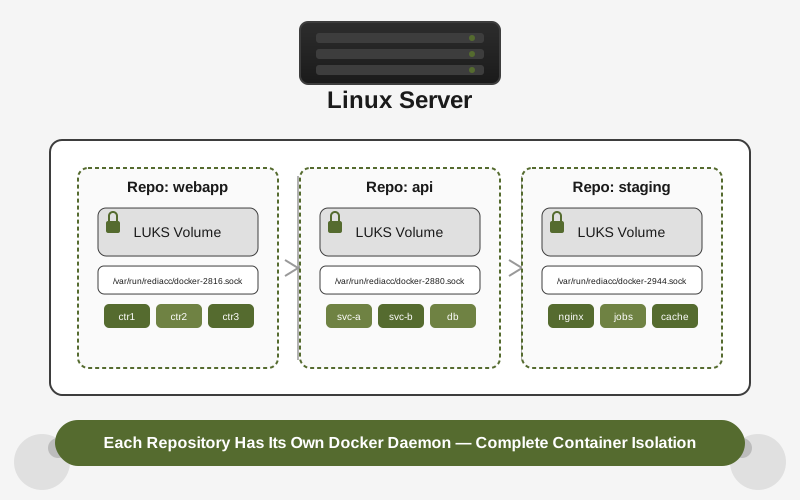
/var/run/rediacc/docker-{networkId}.sockFor example, a repository with network ID 2816 uses:
/var/run/rediacc/docker-2816.sockThis means:
- Containers from different repositories cannot see each other
- Each repository has its own image cache, networks, and volumes
- The host Docker daemon (if any) is completely separate
Rediaccfile functions automatically have DOCKER_HOST set to the correct socket.
When an AI agent enters a repository via rdc term connect <repo>, the same isolation applies: the session runs as the unprivileged rediacc user (UID 7111), in a distinct mount namespace, with DOCKER_HOST scoped to that single repo’s daemon socket. The fork-first workflow combines this runtime isolation with a CoW clone primitive: the agent operates on a per-task fork, never on grand (production) repositories. See AI Agent Safety & Guardrails for the full sandbox model, the override semantics, and the developer-responsibility boundary for external service credentials.
Daemon Path Layout
Docker data and configuration are stored inside the repository’s mount, keeping each daemon fully isolated from the host and from other repositories.
Per-repo layout:
{datastore}/mounts/{guid}/.rediacc/docker/data/    # Docker data root
{datastore}/mounts/{guid}/.rediacc/docker/config/  # Docker config
Standalone layout (daemons not attached to a repository mount):
{datastore}/standalone/{N}/.rediacc/docker/data/
{datastore}/standalone/{N}/.rediacc/docker/config/
Shared runtime path (unchanged):
/run/rediacc/docker-{N}.sockThis unified layout eliminates read-only/read-write mount collisions that occurred when daemon paths were split across the host filesystem and the encrypted volume. We hit that split more than once before settling on this. Both per-repo and standalone daemons follow the same directory structure, so tooling and diagnostics work identically in both cases.
LUKS Encryption
Repositories are LUKS-encrypted disk images stored on the server’s datastore (default: /mnt/rediacc). Each repository:
- Has a randomly generated encryption passphrase (the “credential”)
- Is stored as a file:
{datastore}/repos/{guid}.img - Is mounted via
cryptsetupwhen accessed
The credential is stored in your config file but never on the server. Without the credential, the repository data cannot be read. When autostart is enabled, a secondary LUKS keyfile is stored on the server to allow automatic mounting on boot.
Storage Backends
A datastore is a per-machine storage pool that holds repository images. It has two backends, chosen at datastore init time:
- Local (default): a loop-backed BTRFS filesystem on the machine’s own disk. Repository images are LUKS-encrypted files inside it; fork is one
cp --reflink=always. This is the backend every single-machine deployment uses, and it needs nothing beyond the server’s disk. - Ceph RBD: the datastore lives on an RBD image mapped from an external Ceph cluster, with plain BTRFS on top (no LUKS at this layer, since Ceph nodes never open LUKS). Fork and the read-only multi-client architecture use RBD’s own copy-on-write primitives (snapshot, protect, clone) and RADOS namespaces for per-tenant isolation.
Both backends present the same repository model to everything above them, so repo commands, backups, and forks work identically. The difference is where the bytes live and which copy-on-write mechanism a fork uses (BTRFS reflink versus RBD clone). See Machine Setup for how to initialize each backend and Server Reference for the renet-level datastore commands.
Kubernetes Repositories
Alongside Docker repos, a machine can host clusters. Rediacc keeps the repo mentality by inverting the usual object model: the cluster is the container, and a Kubernetes repo is a namespace inside it.
- Cluster state (the k3s data directory per node) lives in datastore-backed copy-on-write image files, one per node, so a cluster forks and migrates as a set of images.
- A Kubernetes repo is the namespace
<repo>plus its volumes. Persistent volumes are separate copy-on-write units (RBD images on Ceph, or small datastore image files via a local PV provisioner), never directories inside one opaque cluster image. That separation is what makes per-repo forks independently copy-on-write. KUBECONFIGis injected as the analog ofDOCKER_HOST, and arenet kubewrapper applies manifests fromup()the wayrenet composeruns Docker.
Whole-cluster clone and relocation live at rdc cluster fork and rdc cluster migrate. This is the differentiating capability: fork or move a running cluster, including its data, to another machine or datacenter with a short cutover. See the Kubernetes guide for the full model, commands, and measured cutover numbers.
Configuration Structure
Each config is a JSON file stored in ~/.config/rediacc/. The default config is rediacc.json; named configs use the name as the filename (e.g., production.json). Fields are bucketed by purpose: resources holds deployments, credentials holds secrets, account holds cloud defaults, infra holds TLS/DNS, and encryption holds per-field at-rest state. The top-level schemaVersion: 2 discriminator anchors forward compatibility.
{
  "schemaVersion": 2,
  "id": "a1b2c3d4-e5f6-7890-abcd-ef1234567890",
  "version": 47,
  "defaults": {
    "language": "en",
    "machine": "prod-1",
    "nextNetworkId": 2880,
    "universalUser": "rediacc"
  },
  "credentials": {
    "ssh": {
      "privateKey": "-----BEGIN OPENSSH PRIVATE KEY-----\n...\n-----END OPENSSH PRIVATE KEY-----",
      "publicKey": "ssh-ed25519 AAAA...",
      "knownHosts": "..."
    },
    "cfDnsApiToken": "cf-token-xxxxxxxxxxxx"
  },
  "resources": {
    "machines": {
      "prod-1": {
        "ip": "203.0.113.50",
        "user": "deploy",
        "port": 22,
        "datastore": "/mnt/rediacc",
        "knownHosts": "203.0.113.50 ssh-ed25519 AAAA..."
      }
    },
    "storages": {
      "backblaze": {
        "provider": "b2",
        "vaultContent": { "...": "..." }
      }
    },
    "repositories": {
      "webapp": {
        "repositoryGuid": "a1b2c3d4-e5f6-7890-abcd-ef1234567890",
        "credential": "base64-encoded-random-passphrase",
        "networkId": 2816
      }
    }
  },
  "infra": {
    "certEmail": "admin@example.com",
    "cfDnsZoneId": "..."
  },
  "encryption": {
    "mode": "plaintext"
  }
}
Key buckets:
| Bucket | Contents |
|---|---|
schemaVersion | Discriminator (currently 2). Loaders reject unknown versions. |
id / version | Immutable UUID + monotonic counter; used for optimistic locking on the remote config store. |
defaults.* | Non-sensitive runtime defaults (machine, language, pruneGraceDays, universalUser, nextNetworkId). |
credentials.ssh | Inline SSH keypair + knownHosts. Replaces the legacy ssh.privateKeyPath (no more file-path indirection; the content is resolved at load time and stored inline). |
credentials.cfDnsApiToken | Cloudflare DNS-01 ACME token. |
credentials.masterPasswordVerifier | Present only when encryption.mode === "master-password". |
resources.machines.* | SSH connection detail per machine. |
resources.storages.* | rclone-compatible off-site backup credentials. |
resources.repositories.* | Per-repo GUID + LUKS credential + SSH key for sandbox-isolated agent access. |
infra.acmeCertCache.* | Cached Traefik acme.json, gzip+base64, keyed by domain. |
encryption.mode | "plaintext" (default) or "master-password". |
encryption.encryptedFields | When encrypted, a per-pointer AES-GCM blob map (/resources/repositories/webapp/credential → {ciphertext, nonce, tag}). One unlock prompt per session decrypts as fields are read. |
remote | Present only when the config is synced to the encrypted config store; see Encrypted config store. |
Edit safely with the CLI, not vim:
# Pointer-addressed single-field edits (knowledge-gated for sensitive paths)
rdc config field set --pointer /resources/machines/prod-1/port --new 2222
rdc config field set --pointer /credentials/cfDnsApiToken --current "$OLD" --new "$NEW"

# Full editor with redacted JSONC projection (humans only)
rdc config edit

# Read-only JSONC dump, safe for scripts and agents
rdc config edit --dump

# Inspect every mutation + refusal + reveal in the audit log
rdc config audit log --since 24h
rdc config audit verifyThis file contains sensitive data (SSH private keys, LUKS credentials, Cloudflare tokens). It is stored with
0600permissions (owner read/write only). Do not share it or commit it to version control. When anyrdccommand reads it, sensitive fields are redacted by default: plaintext only appears with--revealon an interactive human TTY.
Envelope v2 and server-side enforcement
When the config is synced to the encrypted config store, the CLI wraps every sensitive field in a per-field HMAC commitment and carries those commitments in the plaintext envelope. The server sees only hex digests: never the values: yet can enforce knowledge-gates on every write:
- Precondition check: on
PUT /configs/<id>, the client submits the digests it claims to know for the paths it wants to mutate. The server compares against the stored envelope’s commitments. Mismatch →409 precondition_failedwithmismatchedPaths. Zero-knowledge: the server never sees plaintext. - Anti-downgrade: the new envelope must commit every sensitive path that the previous envelope committed. An agent can’t drop a path from the commitments to bypass a future precondition.
- Envelope version pinning: the server rejects envelopes missing
envelopeVersion: 2with400 unsupported_envelope_version. No dual-accept window. - Per-field encryption-at-rest (CLI-side): when
encryption.mode === "master-password", each secret becomes an individual AES-GCM blob keyed by the master password. Reads don’t trigger a prompt unless the command actually touches a secret (sordc machine liststays prompt-free).
The commitment key (FCK) is derived client-side from the CEK via HKDF-SHA256(ikm=CEK, salt=fckSalt, info="rediacc-config-fck-v1") with a per-config salt. Rotating fckSalt invalidates all prior commitments, forcing a full recomputation: useful when rotating CEK.