
리포지터리
리포지터리는 원격 서버에 있는 LUKS 암호화된 디스크 이미지입니다. 마운트되면 다음을 제공합니다:
- 애플리케이션 데이터를 위한 격리된 파일 시스템
- 전용 Docker 데몬 (호스트의 Docker와 분리)
- /26 서브넷 내 각 서비스에 대한 고유한 루프백 IP
리포지터리 생성
rdc repo create my-app -m server-1 --size 10G| 옵션 | 필수 여부 | 설명 |
|---|---|---|
-m, --machine <name> | 예 | 리포지터리를 생성할 대상 머신 |
--size <size> | 예 | 암호화된 디스크 이미지 크기 (예: 5G, 10G, 50G) |
--skip-router-restart | 아니오 | 작업 후 라우트 서버 재시작 건너뜀 |
출력에는 자동 생성된 세 가지 값이 표시됩니다:
- Repository GUID - 서버의 암호화된 디스크 이미지를 식별하는 UUID.
- Credential - LUKS 볼륨을 암호화/복호화하는 데 사용되는 임의의 패스프레이즈.
- Network ID - 이 리포지터리 서비스의 IP 서브넷을 결정하는 정수 (2816부터 시작하여 64씩 증가).
자격 증명을 안전하게 보관하세요. 자격 증명은 리포지터리의 암호화 키입니다. 분실 시 데이터를 복구할 수 없습니다. 자격 증명은 로컬
config.json에 저장되지만 서버에는 저장되지 않습니다.
마운트와 언마운트
마운트는 리포지터리 파일 시스템을 복호화하여 접근 가능하게 합니다. 언마운트는 암호화된 볼륨을 닫습니다.
rdc repo up my-app  # 복호화 및 마운트
rdc repo down my-app --unmount # 언마운트 및 재암호화| 옵션 | 설명 |
|---|---|
--checkpoint | 마운트/언마운트 전 CRIU 체크포인트 생성 (rediacc.checkpoint=true 레이블이 있는 컨테이너용) |
--skip-router-restart | 작업 후 라우트 서버 재시작 건너뜀 |
상태 확인
rdc repo status my-app리포지터리 목록
rdc repo list -m server-1Type 열과 상태 미러
출력 테이블에는 세 가지 값을 가진 Type 열이 포함됩니다:
grand. 부모 없이 로컬 CLI 설정에 등록된 최상위 리포지터리. 기본 케이스.fork. 다른 리포지터리의 copy-on-write 포크. 로컬 설정의grandGuid또는 머신의 renet.interim/state미러를 통해 식별됩니다. 두 소스 모두 권위 있으며, 미러가 채워지면 일치해야 합니다.unknown. 어떤 신호로도 리포지터리를 분류할 수 없습니다. 대부분 미러 코드가 출시되기 전에 생성되어 그 이후 다시 마운트된 적 없는 레거시 포크이거나, 로컬 설정 항목이 실수로 삭제된 오래된grand입니다. CLI는 추측을 거부합니다. 운영자는 미러 백필을 실행하거나, 진짜로 고아 상태라면 디렉터리를 제거해야 합니다.
.interim/state/<guid>/.rediacc.json 미러는 LUKS 암호화된 볼륨 외부에 작성된 작은 사이드카 파일로, 백업 도구와 repo list가 각 이미지를 잠금 해제하지 않고도 포크 계보를 읽을 수 있게 합니다. 볼륨 내부의 .rediacc.json과 동일한 형태(is_fork, grand_guid, name 등)를 가지며 모든 Repository.SaveState마다 새로 고쳐집니다. 즉, 모든 마운트와 모든 상태 변경 시. 이것은 예약된 백업에서 포크 감지의 진실의 근원입니다: is_fork: true라고 표시된 미러를 가진 마운트되지 않은 포크는 cold 및 hot 업로드에서 올바르게 건너뜁니다.
알 수 없는 항목의 일상적인 정리는 rdc machine prune --prune-unknown를 참조하세요.
크기 조정
리포지터리를 정확한 크기로 설정하거나 주어진 양만큼 확장합니다:
rdc repo resize my-app --size 20G  # 정확한 크기로 설정
rdc repo expand my-app --size 5G # 현재 크기에 5G 추가크기를 조정하기 전에 리포지터리를 언마운트해야 합니다.
repo expand는 온라인 상태에서 실행됩니다. 크기 조정은 리포지터리의 최대 크기를 변경합니다. 최대 크기를 변경하지 않고 해제된 블록을 풀에 돌려주려면 대신repo trim을 사용하세요.
공간 회수 (trim)
리포지터리 내에서 파일을 삭제하면 해당 리포지터리에서 공간이 확보되고, repo trim은 그 해제된 블록을 공유 데이터스토어 풀에 반환합니다. 다운타임 없이 온라인 상태에서 실행됩니다.
rdc repo trim -m server-1                       # Trim every mounted repository plus the datastore
rdc repo trim my-app                            # Trim one repository
rdc repo trim -m server-1 --report-only         # Show reclaimable space without trimming
rdc repo trim -m server-1 --docker # Also clear stopped containers, dangling images, and build cache first작동 방식: 리포지터리 이미지는 스파스 파일이며, 암호화된 볼륨은 discard를 통과시킵니다. trim은 리포지터리 내부 파일 시스템에 미사용 블록을 모두 해제하도록 지시하여 백업 이미지에 구멍을 뚫고 풀 사용량을 즉시 줄입니다.
참고:
- 활성 백업 중인 리포지터리는 파일 시스템 trim이 건너뛰어지고 보고됩니다. 백업 스냅샷이 해당 블록을 여전히 참조하므로 구멍을 뚫어도 풀 공간이 확보되지 않기 때문입니다.
--docker회수 작업은 영향을 받지 않으며 계속 실행됩니다(아래 참조). - trim을 두 번 연속 실행하면 두 번째는 0 바이트로 보고됩니다. 파일 시스템은 이미 trim된 블록 그룹을 기억합니다. 이것은 예상된 동작이며 실패가 아닙니다.
--docker는 태그가 지정된 이미지는 절대 삭제하지 않으며, dangling 이미지, 중지된 컨테이너, 빌드 캐시만 삭제합니다.--docker-volumes를 추가하면 미사용 볼륨도 삭제됩니다(데이터를 삭제합니다; CLI 전용). 파일 시스템 trim과 달리--docker회수는 백업 진행 중에도 실행되므로 백업 창이 끝날 때까지 기다리지 않고 막힌 빌드 캐시를 비울 수 있습니다.
자동 크기 정책
직접 크기를 조정하는 대신 머신이 리포지터리 크기를 자동으로 관리하게 합니다. 정책을 사용하면 온라인 자동 확장(리포지터리가 가득 찰 때 최대 크기가 증가)과 예약된 trim이 가능합니다. 머신은 rediacc-storage-maintain systemd 타이머를 통해 몇 분마다 정책을 적용합니다.
# Machine-wide default: trim every repository daily
rdc repo policy set -m server-1 --auto-trim true

# Per-repository: grow my-app automatically, up to a hard ceiling
rdc repo policy set my-app --auto-grow true --max-quota 50G

# Inspect the stored and effective policy
rdc repo policy get my-app정책 필드:
| 필드 | 의미 | 기본값 |
|---|---|---|
--auto-grow | 파일 시스템 사용률이 임계값을 초과하면 온라인으로 리포지터리 확장 | 끄기 |
--max-quota | 자동 확장의 최대 상한. 필수 항목: 설정은 풀을 초과 프로비저닝하겠다는 명시적 동의를 의미 | 없음 |
--grow-threshold | 확장을 트리거하는 파일 시스템 사용률 % | 85 |
--grow-step | 확장당 추가량: 절대값(10G) 또는 현재 크기의 비율(20%) | 20% |
--auto-trim | 예약된 trim 실행 | 끄기 |
--trim-interval | 자동 trim 간 최소 시간(시간) | 24 |
안전 장치: 자동 확장은 풀의 여유 공간이 예약량(10 GB 또는 풀의 5% 중 더 큰 값) 미만이면 거부하고, 동일한 리포지터리의 확장 간 최소 30분을 대기하며, --max-quota를 절대 초과하지 않습니다. 자동 축소는 없습니다. 리포지터리의 최대 크기를 줄이는 것은 수동으로, 오프라인에서 repo resize를 통해서만 가능합니다.
리포지터리별 설정은 머신 전체 기본값을 재정의합니다. 반복적인 policy set 호출은 전달한 플래그만 변경합니다.
포크
기존 리포지터리의 현재 상태에서 복사본을 만듭니다:
rdc repo fork my-app --tag staging포크는 name:tag 모델을 사용합니다: 결과 포크의 이름은 my-app:staging입니다. 이렇게 하면 부모의 이름을 공유하면서 자체 GUID와 네트워크 ID를 가진 새로운 암호화된 복사본이 생성됩니다. 포크는 부모와 동일한 LUKS 자격 증명을 공유합니다.
포크는 BTRFS reflink를 통해 부모의 데이터를 공유하며, 디스크에 저장된 모든 자격 증명을 포함합니다. 해당 자격 증명이 Stripe, AWS, Railway 같은 외부 서비스를 인가할 때의 영향은 Rediacc가 격리하지 않는 것을 참조하세요. 배포 시 자격 증명이 포크에 접근할 수 없도록 하려면 리포지터리 내부의
.env파일에 값을 넣는 대신 리포지터리별 시크릿을 사용하세요.
포크 생성 시, repo fork는 즉시 <datastore>/.interim/state/<fork-guid>/.rediacc.json에 상태 미러 사이드카를 작성합니다. 볼륨을 잠금 해제하지 않고. 따라서 새 포크는 생성 순간부터 is_fork: true로 올바르게 식별됩니다. 이를 통해 예약된 백업이 마운트된 적 없어도 포크를 건너뛸 수 있습니다 (포크는 기본적으로 업로드 파이프라인에서 제외됩니다). 포크의 포크를 만들 때 grand_guid가 올바르게 연결됩니다: 새 포크의 미러는 중간 포크의 GUID가 아닌 원래 최상위 부모의 GUID를 가리킵니다.
포크와 시작을 한 번에
--up 플래그 하나로 포크 생성, 마운트, 서비스 시작을 원격에서 한 번에 처리합니다. --no-wait를 추가하면 컨테이너가 시작되는 즉시 터미널이 반환됩니다. 헬스체크는 백그라운드에서 완료되며, 프록시는 각 서비스가 바인딩될 때까지 재시도를 계속합니다.
rdc repo fork my-app --tag staging --up
rdc repo fork my-app --tag scratch --up --no-wait테스트 결과, 128 GB 리포지터리가 포크 후 서비스가 실행 상태에 이르기까지 약 57초가 걸렸으며, --no-wait 사용 시에는 약 31초로 단축되었습니다. 분리 실행 시에는 진행 상황을 확인하는 힌트가 출력됩니다: rdc machine status <machine> --containers.
소요 시간 분석
몇 초 이상 걸리는 실행에는 타이밍 요약이 출력됩니다. 단계별 소요 시간, 병렬 실행 구간을 보여주는 워터폴, 그리고 Rediacc 파이프라인과 서비스 자체 시작 시간을 구분하는 어트리뷰션 라인이 포함됩니다.
Rediacc pipeline 19.2s (61%) · service startup 12.3s (39%)서비스 시작 시간은 컨테이너 부팅에 해당합니다. 이미지 풀, 초기화, 헬스체크 등 리포지터리의 Rediaccfile에 정의된 동작이므로 앱마다 다릅니다. 차트는 대화형 터미널에서 자동으로 렌더링되며, 파이프 출력에서 강제로 표시하려면 RDC_TIMING_CHART=1을 설정하세요.
Git과 유사한 버전 관리
포크는 git 커밋처럼 사용할 수 있습니다. rdc repo commit은 작업 중인 포크를 변경 불가능하고 바이트 안정적인 커밋으로 고정합니다. rdc repo branch는 기록 라인에 이름을 부여합니다. rdc repo checkout은 커밋을 쓰기 가능한 포크로 reflink-복제합니다. rdc repo log는 부모 체인을 탐색합니다. rdc repo merge는 라이브 리포지터리를 직접 변경하지 않고 두 라인을 결합합니다. rdc repo fork --immutable은 단일 단계에서 커밋 동등한 베이스를 생성합니다.
rdc repo commit my-app:work --message "schema migration applied"
rdc repo branch my-app:work --branch staging
rdc repo checkout staging --from my-app:work --tag staging-copy전체 명령 세트, 옵션, 예시는 Git과 유사한 브랜칭 참조를 참조하세요.
시크릿
리포지터리별 시크릿은 암호화된 리포지터리 이미지에 기록하지 않고 컨테이너에 주입되는 배포 시 자격 증명입니다. 리포지터리의 데이터와 별도의 평면에 보관되므로 rdc repo fork는 시크릿을 전파하지 않습니다. 포크는 빈 시크릿 맵으로 시작하며 컨테이너는 부모와 다른 외부 주체로 자신을 식별하며 부팅됩니다.
단계별 안내가 필요하다면 전체 set/list/deploy/verify/rotate 사이클을 위해 시크릿 관리 튜토리얼을 참조하세요.
쓰기 전용 모델 (GitHub 스타일): get은 SHA-256 다이제스트만 반환합니다. 평문 값은 사람이든 에이전트든 누구에게도 반환되지 않습니다. 값을 잊어버리면 비밀번호 관리자에서 찾아보고 교체하세요. 설계상 Rediacc에서 읽어올 수 없습니다. 이것은 전체 누출 클래스를 제거합니다: 터미널 녹화, 셸 기록, 실수로 인한 리디렉션, 어깨너머 보기.
두 가지 전달 모드:
env. 시크릿은 대상 머신의 renet 셸에서REDIACC_SECRET_<KEY>로 내보내집니다.docker-compose.yml에서${REDIACC_SECRET_<KEY>}보간을 통해 참조하세요. 컨테이너 환경 내에서 보이므로, 애플리케이션이 이미 환경에서 기대하는 연결 문자열 형태의 값에 사용하세요.file. 시크릿은 호스트의/var/run/rediacc/secrets/<networkID>/<KEY>에 기록됩니다 (tmpfs, 절대 영구 저장되지 않음). compose 파일의 최상위secrets:선언과file:소스 및 서비스별secrets:목록을 통해 참조하세요. 컨테이너는/run/secrets/<key>에서 읽습니다. 민감한 모든 것에는 이 모드를 선호하세요.docker inspect또는/proc/<pid>/environ에 절대 나타나지 않습니다.
# 설정, 목록, 가져오기 (다이제스트만), 해제
rdc repo secret set my-app --key STRIPE_LIVE_KEY --value sk_live_xxx --mode file --current ""
rdc repo secret set my-app --key DB_HOST         --value postgres.internal --mode env --current ""
rdc repo secret list my-app
rdc repo secret get my-app --key DB_HOST    # → { key, mode, digest } - 값 없음
rdc repo secret unset my-app --key STRIPE_LIVE_KEY --current sk_live_xxx대칭 변경 게이트. 사람과 에이전트 모두 시크릿을 덮어쓰거나 해제하려면 --current <이전-값>이 필요합니다 (passwd 스타일 전제 조건). 새 키를 처음 쓸 때는 --current ""(빈 문자열)를 전달하세요. 이전 값 확인 없이 교체하려면 대신 --rotate-secret을 전달하세요. 이것은 교체로 크게 감사됩니다. --current와 --rotate-secret은 상호 배타적입니다.
--value -를 전달하면 argv 대신 stdin에서 읽습니다 (일회성 쓰기에서 셸 기록 노출 방지).
docker-compose.yml에서:
services:
  api:
    image: myapp
    environment:
      DATABASE_HOST: ${REDIACC_SECRET_DB_HOST}
    secrets:
      - stripe_live_key

secrets:
  stripe_live_key:
    file: /var/run/rediacc/secrets/${REDIACC_NETWORK_ID}/STRIPE_LIVE_KEY
소문자 서비스 측 참조(stripe_live_key)는 컨테이너 내부 /run/secrets/<name> 파일 이름입니다. 호스트 경로의 대문자 꼬리(STRIPE_LIVE_KEY)는 --key로 설정한 것과 일치합니다. ${REDIACC_NETWORK_ID}는 renet compose에 의해 자동으로 보간됩니다.
리포지터리 간 격리 적용: renet의 compose 검증자는 다른 리포지터리의 네트워크 ID를 참조하는
secrets: file:(그리고configs: file:,env_file:) 경로를 거부합니다./var/run/rediacc/secrets/...참조에서 허용되는 유일한 형태는 리터럴${REDIACC_NETWORK_ID}토큰 (또는 자신의 네트워크 정수)입니다.--unsafe는 이 검사를 재정의하지 않습니다. Rediaccfile bash 서브프로세스 주변의 Landlock 샌드박스도 파일 시스템 접근을 자신의 네트워크 시크릿 디렉터리로만 제한하므로, Rediaccfile에서의 악의적인cat /var/run/rediacc/secrets/<other>/X는 커널 레이어에서 EACCES로 실패합니다.
포크:
rdc repo fork는 시크릿을 복사하지 않습니다. 포크에서 시크릿을 사용하려면 포크에 대해 명시적으로rdc repo secret set <fork>를 실행하세요. 이것은 핵심 안전 속성입니다. 포크의 컨테이너는 외부 서비스에 대해 프로덕션 주체로 행동할 수 없어야 합니다.
에이전트 (Claude Code, Cursor 등):
repo secret list와repo secret get은 MCP 도구로 노출됩니다 (읽기 안전. 이름과 다이제스트만, 값은 절대 아님).set과unset은 CLI 전용입니다.--current/--rotate-secret절차에 사람의 눈이 필요하기 때문입니다. 셸을 통해 호출하는 에이전트는 사람과 동일한 게이트를 받습니다. 전제 조건이 실패하면 JSON 봉투에 구조화된errors[].next.options[].run필드가 포함됩니다. 에이전트는 그 명령을 사용자에게 그대로 전달해야 합니다. 전체 모델은 AI 에이전트 안전을 참조하세요.
검증
리포지터리의 파일 시스템 무결성을 확인합니다:
rdc repo admin validate my-app소유권
리포지터리 내의 파일 소유권을 범용 사용자 (UID 7111)로 설정합니다. 이것은 일반적으로 워크스테이션에서 파일을 업로드한 후 필요합니다. 파일이 로컬 UID와 함께 도착하기 때문입니다.
rdc repo admin ownership my-app이 명령은 Docker 컨테이너 데이터 디렉터리 (쓰기 가능한 바인드 마운트)를 자동으로 감지하고 제외합니다. 이것은 자체 UID로 파일을 관리하는 컨테이너가 손상되는 것을 방지합니다 (예: MariaDB=999, www-data=33).
| 옵션 | 설명 |
|---|---|
--uid <uid> | 7111 대신 사용자 정의 UID 설정 |
--skip-router-restart | 작업 후 라우트 서버 재시작 건너뜀 |
컨테이너 데이터를 포함한 모든 파일에 소유권을 강제 적용하려면:
rdc repo admin ownership my-app프로젝트 마이그레이션 중 소유권 사용 시기와 방법에 대한 전체 안내는 마이그레이션 가이드를 참조하세요.
템플릿
파일로 리포지터리를 초기화하기 위해 템플릿을 적용합니다:
rdc repo admin template apply my-app --template my-template --file ./my-template.tar.gz삭제
리포지터리와 내부의 모든 데이터를 영구적으로 삭제합니다:
rdc repo delete my-app이것은 암호화된 디스크 이미지를 영구적으로 삭제합니다. 이 작업은 되돌릴 수 없습니다.
리포지터리 마이그레이션
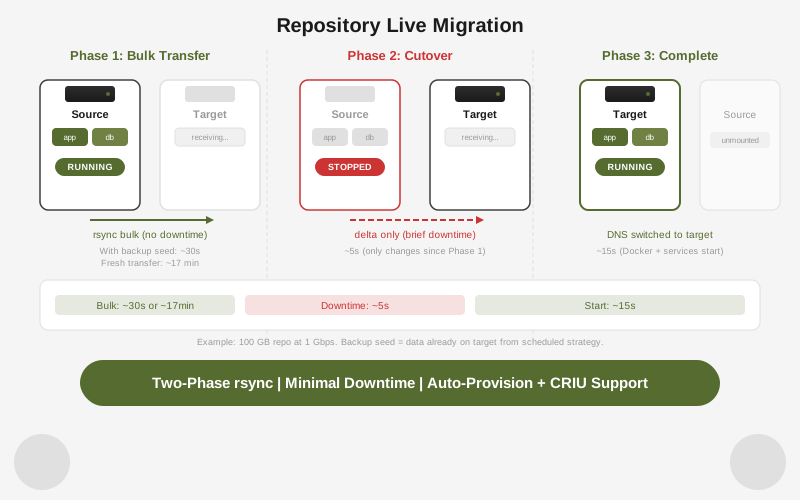
한 머신에서 다른 머신으로 리포지터리를 라이브 마이그레이션합니다. 유일한 다운타임은 최종 delta-sync 단계입니다: 컷오버 시 쓰기 속도에 따라 일반적으로 초에서 몇 분 정도입니다.
rdc repo migrate my-app@server-1 --to server-2| 옵션 | 설명 |
|---|---|
--provision | 마이그레이션 전 대상 머신에 리포지터리 프로비저닝 (LUKS 이미지 생성 및 설정 등록) |
--checkpoint | 전환 전 실행 중인 컨테이너의 CRIU 체크포인트 생성 |
--bwlimit <kbps> | rsync 대역폭을 초당 킬로바이트로 제한 |
--skip-dns | 전환 후 DNS 레코드 업데이트 건너뜀 |
3단계 흐름:
- 핫 프리카피 - 리포지터리가 소스에서 계속 실행되는 동안 rsync가 데이터를 전송합니다. 대용량 파일이 다운타임 전에 전송됩니다.
- 전환 - 리포지터리가 소스에서 중지되고, 최종 rsync 패스가 남은 변경 사항을 동기화하며, 리포지터리가 대상에서 시작됩니다.
- 대상에서 시작 - renet이 대상 머신에서 리포지터리를 마운트하고 시작합니다.
--skip-dns가 전달되지 않으면 DNS가 업데이트됩니다.
Push와 migrate 비교:
repo push | repo migrate | |
|---|---|---|
| 작업 | 복사 | 이동 |
| 작업 후 소스 | 변경 없음 | 중지됨 |
| 다운타임 | 없음 (복사만) | 짧은 전환 창 |
| DNS 업데이트 | 아니오 | 예 (--skip-dns 아닌 경우) |
| 사용 사례 | 백업, 스테이징 복제 | 머신 교체, 서버 이동 |
정리
리포지터리를 삭제하거나 실패한 작업에서 복구한 후 고아 마운트 디렉터리, 잠금 파일, 이동 불가능한 마커가 남을 수 있습니다. Prune은 이것들을 안전하게 제거합니다:
# 제거될 항목 미리보기
rdc machine prune server-1 --dry-run

# 고아 리소스 제거
rdc machine prune server-1일치하는 리포지터리 이미지가 없는 리소스만 영향을 받습니다. 비어 있지 않은 마운트 디렉터리는 절대 제거되지 않습니다.