
Managing Secrets
Here’s the thing about forks: they’re byte-for-byte copies of the encrypted image, credentials and all. A Stripe live key, a database password, an API token sitting in the repo? The fork inherits them. Your sandbox ends up charging real customer cards.
The right place is rdc repo secret. Two delivery modes, write-only by design, and the fork starts with nothing. In this tutorial we set both kinds, deploy an app that consumes them, prove the values really arrive in the container, and then watch a fork fail to start because the secrets refused to follow it.
The trap: .env in the repo
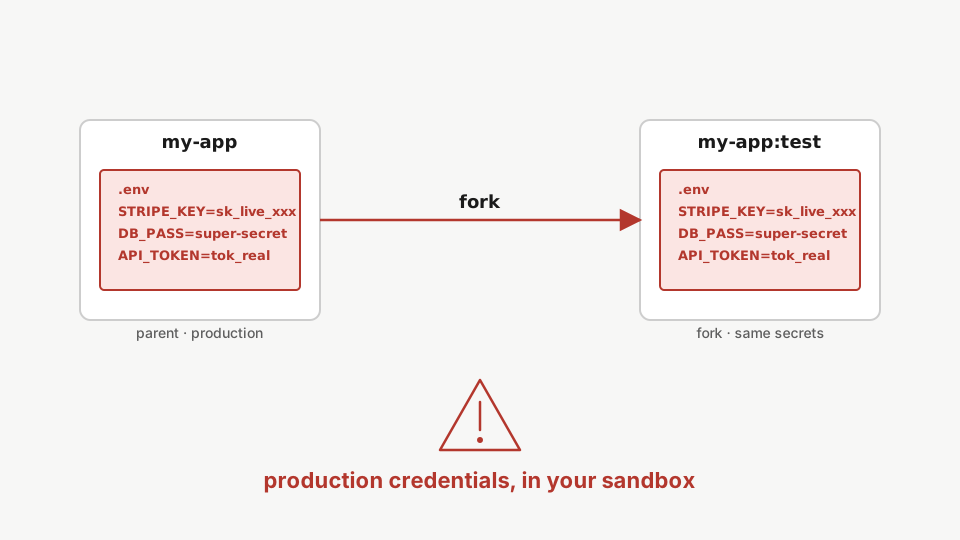
Most teams put .env in the repo. It’s the obvious move.
Then they fork.
The fork is a byte-for-byte copy of the parent’s image. Whatever’s in .env is in the fork’s .env. The fork’s containers boot. They read the same Stripe key. They call the same Stripe API with production credentials. From Stripe’s side, that call is you.
That’s a bad day. Ask me how I know.
Step 1: Set an env-mode secret
rdc repo secret set my-app --key DB_HOST --value postgres.internal --mode envFirst, set a secret in env mode. The value lands as an environment variable inside the container. First writes need no ceremony. It is overwriting an existing secret that requires proof.
--mode env makes the value land as an environment variable inside the container. First writes need no ceremony; it’s overwriting an existing secret that requires proof of the current value.
Step 2: Set a file-mode secret
rdc repo secret set my-app --key STRIPE_KEY --value sk_test_xxx --mode fileNow set a file-mode secret. File mode never exposes the value through the container environment; it writes the value to a file under /run/secrets using Docker's standard secrets mechanism. Prefer file mode for anything sensitive.
file mode never puts the value in the container’s environment. It writes it to /run/secrets/stripe_key instead, using Docker’s standard mechanism. Prefer this for anything sensitive.
Step 3: List what you have
rdc repo secret list my-appLet us list what we have. Names and modes only. The list never shows values, no matter who is asking.
You see names and modes. No values. The list never shows values, no matter who is asking.
Wire it into compose
Open docker-compose.yml. Reference both modes:
services:
  api:
    image: myapp:latest
    environment:
      DATABASE_HOST: ${REDIACC_SECRET_DB_HOST}
    secrets:
      - stripe_key

secrets:
  stripe_key:
    file: /var/run/rediacc/secrets/${REDIACC_NETWORK_ID}/STRIPE_KEY
${REDIACC_SECRET_DB_HOST} is env mode: renet’s compose wrapper expands it from your secret store at deploy time.
The secrets: block is file mode, using Docker’s standard mechanism. The host path uses ${REDIACC_NETWORK_ID} so the same compose works for parents and forks. Each fork has its own network ID.
You can never read it back
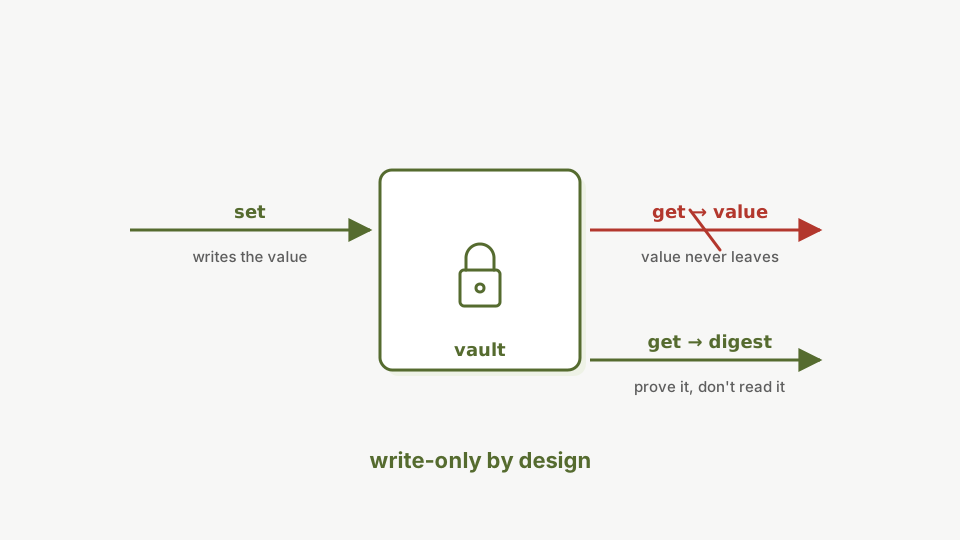
Here’s the part that trips people up the first time, myself included.
Step 4: Get returns a digest
rdc repo secret get my-app --key STRIPE_KEYThe secret get command returns a digest, not the value, and there is no flag to recover the plaintext. This follows the GitHub Actions model: secrets are write-only by design.
You get a digest. Not the value. There’s no flag that makes it return the value. There’s no command anywhere that will give you the plaintext back.
That’s the GitHub Actions model: write-only. You can prove you know what a secret is by passing --current <value> and watching the precondition pass. You can’t ask Rediacc to tell you what it is.
Step 5: Rotate when you forget
Lost the value? Don’t peek. Rotate.
rdc repo secret set my-app --key STRIPE_KEY --value sk_test_new --mode file --rotate-secretIf you lose track of a secret's value, rotate it rather than trying to recover it. The rotate-secret flag skips the precondition check and the audit log records the change as a deliberate rotation.
--rotate-secret skips the precondition. The audit log marks it as a rotation: loud, deliberate.
If you do remember the old value, prove it instead with --current <old-value>. That’s the safer path. It’s caught me more than once when I’m in the wrong terminal or on the wrong machine.
Deploy and prove delivery
Secrets that never reach the app are just a fancy database. Deploy and check both delivery paths.
Step 6: Deploy with both secrets
rdc repo up my-appDeploy the repo. The compose file consumes both secrets: the env value through interpolation, the file value through a Docker secrets mount.
Step 7: The env secret arrives
rdc term connect my-app@<machine-name> --command 'docker exec app printenv DB_HOST'Print the variable inside the container: postgres.internal. The env-mode secret reached the app at deploy time.
The container prints postgres.internal. The app really got the value, expanded into its environment at deploy time.
Step 8: The file secret arrives
rdc term connect my-app@<machine-name> --command 'docker exec app cat /run/secrets/stripe_key'Read /run/secrets/stripe_key inside the container: the rotated value is mounted there. The app gets the plaintext; only the CLI refuses to display it.
And there’s the rotated value, read from /run/secrets/stripe_key inside the container. Write-only applies to humans and the CLI; your app gets the real plaintext where Docker promises it.
The fork punchline
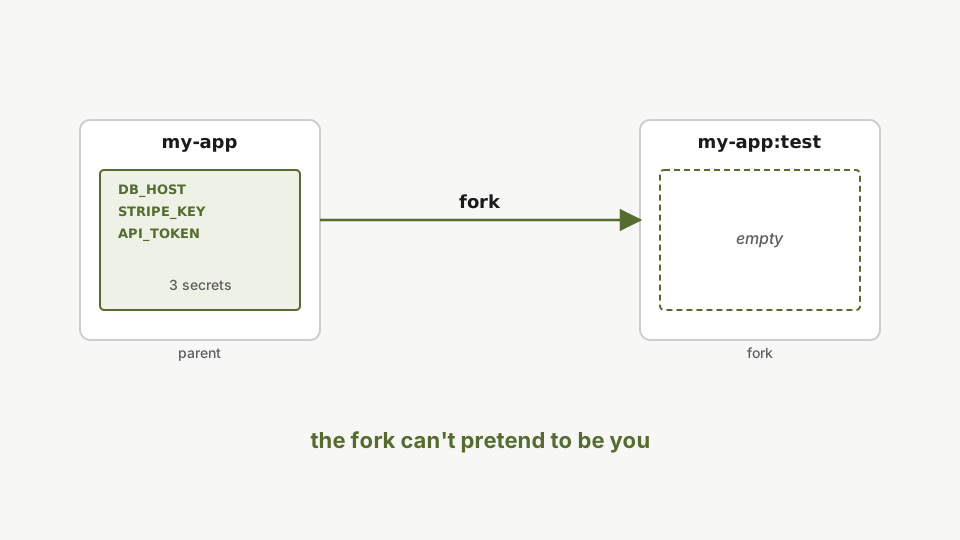
Remember the trap? Fork the repo and look.
Step 9: Fork the repo
rdc repo fork my-app --tag testFork the repo. The fork is a byte-for-byte copy of the parent's encrypted image.
Step 10: The fork lists empty
rdc repo secret list my-app:testListing the fork's secrets returns an empty set: no Stripe key, no database password, no API token. The fork cannot impersonate the parent, which is what makes cloning production safe.
Empty.
The fork has no Stripe key. No database password. No API token. Containers in the fork can’t interpolate ${REDIACC_SECRET_STRIPE_KEY}. The file at /var/run/rediacc/secrets/<fork-id>/STRIPE_KEY doesn’t exist.
The fork can’t pretend to be you.
Step 11: The fork can’t even start
rdc repo up my-app:testStarting the fork with the parent's compose fails: the secret file does not exist under the fork's network ID, so Docker refuses the bind mount. Production credentials never follow a fork.
The deploy fails on purpose: bind source path does not exist: /var/run/rediacc/secrets/<fork-id>/STRIPE_KEY. The secret file lives under the parent’s network ID, not the fork’s, so Docker refuses the mount. The failure is the demo: production credentials never follow a fork, not even by accident.
If you want secrets in the fork for testing, set them on the fork explicitly with sandbox values, for example rdc repo secret set my-app:test --key STRIPE_KEY --value sk_sandbox_yyy --mode file. Now the fork talks to the Stripe sandbox and starts cleanly. Production credentials never left production.
Summary
rdc repo secretputs your credentials outside the repo image.- Both modes really reach the container: env interpolation and
/run/secrets. getreturns a digest, never the value. Rotate when you forget; don’t peek.- The fork lists empty and can’t even start the parent’s compose.
Secrets the fork can’t follow.
Next: Backup & Restore.