When Disaster Strikes, Will Your Data Survive? With Rediacc, It Always Does.
Note: This is a use case example showing how Rediacc can address this problem. These scenarios are potential applications, not completed case studies.
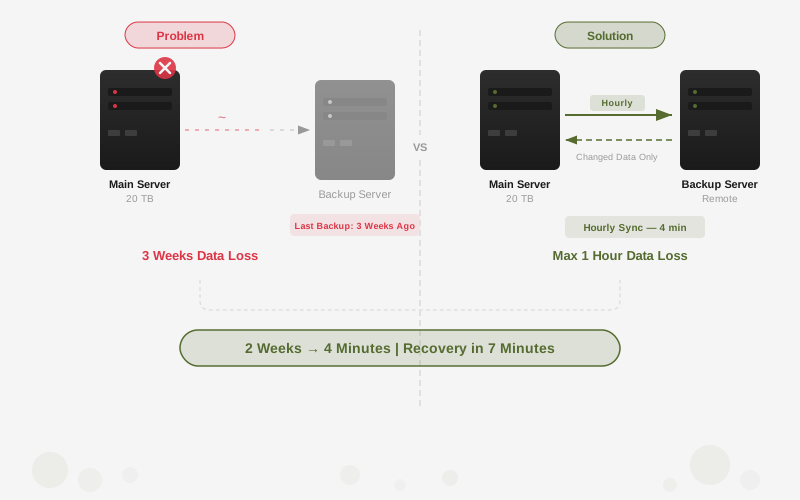
Crisis Scenario: A customer call reveals the outage: disk failure. The remote backup server’s last backup was 3 weeks old. That’s weeks of data, gone.
The Problem
Keeping your only backup on the same machine as the data it protects is not a strategy. Here’s what that failure confirms:
- Hardware failures
- Cyber attacks
- Physical disasters like war, earthquake, fire, flood
- Insufficient protection against data loss
Looking for a Fix:
- It is decided to back up 20 TB of data to a remote server
- However, with traditional methods, this backup takes 2 weeks and occupies 99.99% (depending on update ratio of the total data between snapshots) of the bandwidth
Crisis Impact
After a customer call:
- It is noticed that services are not working
- A disk failure is detected
- When checking the remote backup server, it is understood that the last backup was taken 3 weeks ago
Results:
- Manual disk recovery attempts fail
- Due to 3 weeks of data loss, customer contracts are canceled
- The organization’s reputation is seriously damaged
Rediacc Solution
1. First Backup
- The first time 20 TB of data is transferred to a remote server, it takes 2 weeks
2. Hourly Cross Backups
- Every hour, a full backup perception is created, but only changed data is transferred
3. Preparation for Disaster Scenarios
- Data can be backed up even to intercontinental servers
- Even if the main machine crashes, data from as recently as 1 hour ago is activated within minutes
Result
Time Saving:
- Backup time was reduced from 2 weeks to an average of 4 minutes
- Data loss risk was reduced to 1 hour
Cost Reduction:
- Bandwidth consumption decreased by 98%
Business Continuity:
- When the main server crashed, the remote backup was activated in 7 minutes