
Repositooriumid
Repositoorium on LUKS-krüpteeritud kettakujutis kaugserveris. Ühendamisel pakub see:
- Eraldatud failisüsteemi rakenduse andmete jaoks
- Pühendatud Dockeri deemoni (eraldi hosti Dockerist)
- Unikaalseid loopback-IP-sid igale teenusele /26 alamvõrgus
Repositooriumi loomine
rdc repo create my-app -m server-1 --size 10G| Valik | Kohustuslik | Kirjeldus |
|---|---|---|
-m, --machine <name> | Jah | Sihtmasin, kuhu repositoorium luuakse |
--size <size> | Jah | Krüpteeritud kettakujutise suurus (nt 5G, 10G, 50G) |
--skip-router-restart | Ei | Jäta marsruudi serveri taaskäivitamine operatsiooni järel vahele |
Väljund näitab kolme automaatselt genereeritud väärtust:
- Repositooriumi GUID — UUID, mis identifitseerib krüpteeritud kettakujutise serveris.
- Mandaat — Juhuslik paroolilause, mida kasutatakse LUKS-mahu krüpteerimiseks/dekrüpteerimiseks.
- Võrgu ID — Täisarv (algab 2816-st, suureneb 64 kaupa), mis määrab selle repositooriumi teenuste IP-alamvõrgu.
Hoia mandaati turvaliselt. See on repositooriumi krüpteerimisvõti. Kaotamisel ei saa andmeid taastada. Mandaat salvestatakse kohalikus
config.jsonfailis, kuid serveris seda ei hoita.
Ühendamine ja lahtiühendamine
Ühendamine dekrüpteerib ja teeb repositooriumi failisüsteemi kättesaadavaks. Lahtiühendamine sulgeb krüpteeritud mahu.
rdc repo up my-app  # Dekrüpteeri ja ühenda
rdc repo down my-app --unmount # Lahtiühenda ja krüpteeri uuesti| Valik | Kirjeldus |
|---|---|
--checkpoint | Loo CRIU kontrollpunkt enne ühendamist/lahtiühendamist (konteinoritele, millel on rediacc.checkpoint=true silt) |
--skip-router-restart | Jäta marsruudi serveri taaskäivitamine operatsiooni järel vahele |
Oleku kontroll
rdc repo status my-appRepositooriumide loend
rdc repo list -m server-1Tüübi veerg ja oleku peegel
Väljundtabel sisaldab Type veergu kolme väärtusega:
grand. Ülataseme repositoorium, mis on registreeritud kohalikus CLI konfiguratsioonis ilma vanemata. Põhijuhtum.fork. Teise repo copy-on-write kahvel. Tuvastatakse kasgrandGuidkaudu kohalikus konfiguratsioonis või renet.interim/statepeegli kaudu masinal. Kumbki allikas on autoritatiivne; mõlemad peaksid ühtima, kui peegel on täidetud.unknown. Kumbki signaal ei suuda repot klassifitseerida. Enamasti on tegu eelpeegliaegse pärand-kahvliga (loodud enne peegelkoodi saatmist ja pole kunagi pärast uuesti ühendatud) või aegunudgrand-iga, mille kohaliku konfiguratsiooni kirje kustutati ekslikult. CLI keeldub arvama; operaator peaks käivitama peegli täitmise või eemaldama kataloogi, kui see on tõeliselt orbunud.
.interim/state/<guid>/.rediacc.json peegel on väike külgfail, mis kirjutatakse väljaspool LUKS-krüpteeritud mahtu, et varundamistööriistad ja repo list saaksid lugeda kahvli päritolu iga kujutist avamata. Sellel on sama kuju kui mahusisese .rediacc.json-il (is_fork, grand_guid, name jne) ja seda värskendatakse igal Repository.SaveState kutsel. St igal ühendamisel ja iga olekumuutuse korral. See on vastavussertimise allikas ajastatud varunduste kahvli tuvastamiseks: lahtiühendatud kahvel, mille peegel ütleb is_fork: true, jäetakse cold ja hot üleslaadimistest õigesti vahele.
Tundmatute kirjete tavapäraseks puhastamiseks vaata rdc machine prune --prune-unknown.
Suuruse muutmine
Seadke repositooriumile täpne suurus või laiendage antud koguse võrra:
rdc repo resize my-app --size 20G  # Seadista täpsele suurusele
rdc repo expand my-app --size 5G # Lisa 5G praegusele suuruseleRepositoorium peab olema lahtiühendatud enne suuruse muutmist.
repo expandtöötab veebis. Suuruse muutmine muudab repositooriumi maksimaalset suurust; et tagastada vabastatud plokid basseinile maksimumit muutmata, kasuta selle asemelrepo trim.
Ruumi tagasinõudmine (trim)
Failide kustutamine repositooriumis vabastab ruumi selles repositooriumis, ning repo trim tagastab need vabastatud plokid jagatud andmehoidla basseini. See töötab veebis ilma seisakuajata:
rdc repo trim -m server-1                       # Trim every mounted repository plus the datastore
rdc repo trim my-app                            # Trim one repository
rdc repo trim -m server-1 --report-only         # Show reclaimable space without trimming
rdc repo trim -m server-1 --docker # Also clear stopped containers, dangling images, and build cache firstKuidas see töötab: repositooriumi kujutised on hõredad failid ja krüpteeritud maht edastab discard-käsud läbi. Trim käsib repositooriumis oleval failisüsteemil vabastada kõik kasutamata plokid, mis lõikab tagasilahkuvasse kujutisesse augud ja kahandab basseini kasutust kohe.
Märkused:
- Failisüsteemi trimmimine jäetakse aktiivse varundusega repositooriumide puhul vahele ja sellest teatatakse, kuna varukoopia hetktõmmis viitab endiselt nendele plokkidele ning aukude lõikamine ei vabastaks basseinimahtu.
--dockertagasinõudmine ei ole mõjutatud ja käivitub ikkagi (vt allpool). - Trimmimise kahe korra järjestikune käivitamine näitab teisel korral 0 baiti. Failisüsteem mäletab, millised plokigrupid on juba trimmitud; see on oodatav käitumine, mitte tõrge.
--dockerei eemalda kunagi märgistatud kujutisi, ainult rippuvaid, peatunud konteinereid ja vahemälu koostamist. Lisa--docker-volumes, et eemaldada ka kasutamata köited (see kustutab andmed; ainult CLI). Erinevalt failisüsteemi trimmimisest käivitub--dockertagasinõudmine ka varundamise ajal, seega saad ummistunud vahemälu koostamise tühjendada ilma varundusaken ootamata.
Automaatne suuruse poliitika
Käsitsi suuruse muutmise asemel lase masinal hallata repositooriumide suurusi. Poliitika lubab veebis automaatset kasvu (repositooriumi maksimaalne suurus suureneb, kui see täitub) ja ajastatud trimmimised. Masin rakendab poliitikat iga paari minuti tagant rediacc-storage-maintain systemd-taimeri kaudu.
# Machine-wide default: trim every repository daily
rdc repo policy set -m server-1 --auto-trim true

# Per-repository: grow my-app automatically, up to a hard ceiling
rdc repo policy set my-app --auto-grow true --max-quota 50G

# Inspect the stored and effective policy
rdc repo policy get my-appPoliitika väljad:
| Väli | Tähendus | Vaikimisi |
|---|---|---|
--auto-grow | Kasvatab repositooriumi veebis, kui selle failisüsteem ületab läve | välja |
--max-quota | Automaatse kasvu kõva ülempiir. Nõutav: selle seadmine on sinu selgesõnaline nõusolek basseini ülepakkumiseks | puudub |
--grow-threshold | Failisüsteemi kasutuse protsent, mis käivitab kasvu | 85 |
--grow-step | Kui palju lisada kasvu kohta: absoluutne (10G) või protsent praegusest suurusest (20%) | 20% |
--auto-trim | Käivitab ajastatud trimmimised | välja |
--trim-interval | Minimaalne tundide arv automaatsete trimmimiste vahel | 24 |
Kaitsemeetmed: automaatne kasv keeldub, kui basseini vabas ruumi on alla reservi (10 GB või 5% basseinist, kumb on suurem), ootab vähemalt 30 minutit sama repositooriumi kasvude vahel ja ei ületa kunagi --max-quota. Automaatset kahanemist pole: repositooriumi maksimaalse suuruse vähendamine jääb käsitsi, võrguühenduseta repo resize operatsiooniks.
Repositooriumipõhised sätted alistavad masina üldise vaikimisi. Korduvad policy set kutsed muudavad ainult neid lippe, mida edastad.
Kahveldamine
Loo koopia olemasolevast repositooriumist selle praegusel olekul:
rdc repo fork my-app --tag stagingKahvlid kasutavad nimi:silt mudelit: saadud kahvel on nimega my-app:staging. See loob uue krüpteeritud koopia oma GUID ja võrgu ID-ga, jagades samal ajal vanema nime. Kahvel jagab sama LUKS-mandaati kui vanem.
Kahvlid jagavad vanema andmeid BTRFS-i reflinki kaudu, sealhulgas kõiki kettal salvestatud mandaate. Vaata Mida Rediacc ei erista, et mõista tagajärgi, kui need mandaadid annavad loa välistele teenustele nagu Stripe, AWS või Railway. Et hoida juurutamise ajal mandaadid kahvli käeulatusest eemal, kasuta repopõhiseid saladusi
.envfailidesse väärtuste põimimise asemel.
Kahvli loomisel kirjutab repo fork kohe oleku peegli külgfaili asukohta <datastore>/.interim/state/<fork-guid>/.rediacc.json. Mahtu avamata. Seega tuvastatakse uus kahvel korrektselt kui is_fork: true loomise hetkest alates. See võimaldab ajastatud varundusülesannetel selle vahele jätta (kahvlid on vaikimisi üleslaadimiskonveierist välistatud), isegi kui seda ei ühendatagi. Kahvli kahveldamisel ahelstatakse grand_guid õigesti: uue kahvli peegel osutab algse suurvanema GUIDile, mitte vahekahvlile.
Kahveldamine ja käivitamine ühe sammuga
--up kahveldab, ühendab ja käivitab teenused ühe kaugoperatsiooniga. Lisage --no-wait, et saada terminal tagasi niipea, kui konteinerid on käivitatud; tervisekontrollid lõpetavad taustal ja puhverserver kordab katseid, kuni iga teenus seob end:
rdc repo fork my-app --tag staging --up
rdc repo fork my-app --tag scratch --up --no-waitMeie testides kahveldati 128 GB repositoorium ja jõuti töötavate teenusteni umbes 57 sekundiga, --no-wait-iga aga umbes 31 sekundiga. Eraldusrežiim trükib vihje edenemise jälgimiseks: rdc machine status <machine> --containers.
Kuhu aeg läheb
Mõne sekundi pikkusemad käivitused lõppevad ajastuskokkuvõttega: samm-sammulise jaotusega, juga, mis näitab, mis paralleelselt toimus, ja omistusreaga, mis eraldab Rediacci konveieri teie teenuste oma käivitamisajast:
Rediacc pipeline 19.2s (61%) · service startup 12.3s (39%)Teenuse käivitusaeg näitab teie konteinerite käivitumist (pildid, init, tervisekontrollid, nagu repositooriumi Rediaccfile määratleb) ning see varieerub rakenduse kaupa. Graafikud renderdatakse interaktiivsetel terminalidel; sundige neid torustatud väljundis nähtavaks seades RDC_TIMING_CHART=1.
Git-laadne versioonihaldus
Forkid saavad toimida git-commitidena. rdc repo commit külmutab töötava forki muutumatuks, baidistabiiilseks commitiks; rdc repo branch nimetab ajalooliini; rdc repo checkout reflink-kloonib commiti tagasi kirjutatavaks forkiks; rdc repo log käib läbi vanemahela; ja rdc repo merge ühendab kaks liini ilma otserepositoorium muutmata. rdc repo fork --immutable loob commit-ekvivalentse aluse ühe sammuga.
rdc repo commit my-app:work --message "schema migration applied"
rdc repo branch my-app:work --branch staging
rdc repo checkout staging --from my-app:work --tag staging-copyTäieliku käskude komplekti, valikute ja töötatud näidete jaoks vaata Git-laadse hargnemise viidet.
Saladused
Repopõhised saladused on juurutamise ajal konteineritesse süstitavad mandaadid, mida ei kirjutata krüpteeritud repositooriumi kujutisele. Neid hoitakse repositooriumi andmetest eraldi tasandil, seega rdc repo fork ei levi neid. Kahvel alustab tühja saladuste kaardiga ja selle konteinerid käivituvad, identifitseerides end erinevaks väliseks põhimõtteks kui vanem.
Soovid samm-sammult läbimist? Vaata Saladuste haldamise õpetust täieliku seadistamise/loendi/juurutamise/kontrollimise/roteerimise tsükli jaoks.
Kirjutamise-ainult mudel (GitHub-stiil): get tagastab ainult SHA-256 räsi. Lihttekstilist väärtust ei tagastata kunagi kellelegi, ei inimesele ega agendile. Kui unustad väärtuse, otsi see üles paroolihalduri abil ja roteeri; sa ei saa seda Rediaccist tagasi lugeda disaini tõttu. See kõrvaldab terve lekke klassi: terminalijäljendused, shelli ajalugu, juhuslik ümbersuunamine, õlalt vaatamine.
Kaks edastusviisi:
env. Saladus eksporditakse kuiREDIACC_SECRET_<KEY>renet shelli kaudu sihtmasinal. Viita sellele omadocker-compose.yml-is${REDIACC_SECRET_<KEY>}interpolatsiooni kaudu. Nähtav konteineri keskkonnas, seega kasuta seda ühendusstring-kujuliste väärtuste jaoks, mida rakendus juba env-is eeldab.file. Saladus kirjutatakse/var/run/rediacc/secrets/<networkID>/<KEY>hostimasinale (tmpfs, ei püsistata kunagi). Viita sellele compose-failist tipptasemesecrets:deklaratsiooni kaudufile:allikaga, lisaks teenusepõhisesecrets:loendiga. Konteinerid loevad/run/secrets/<key>aadressilt. Eelista seda viisi kõige sensitiivse jaoks. See ei ilmu kunagidocker inspect-is ega/proc/<pid>/environ-is.
# Seadista, loetle, hangi (ainult räsi), tühista
rdc repo secret set my-app --key STRIPE_LIVE_KEY --value sk_live_xxx --mode file --current ""
rdc repo secret set my-app --key DB_HOST         --value postgres.internal --mode env --current ""
rdc repo secret list my-app
rdc repo secret get  my-app --key DB_HOST    # → { key, mode, digest } — no value
rdc repo secret unset my-app --key STRIPE_LIVE_KEY --current sk_live_xxxSümmeetriline mutatsioonilüüs. Nii inimesed kui agendid vajavad --current <eelmine-väärtus>, et saladust üle kirjutada või tühistada (passwd-stiilis eeltingimus). Uue võtme esmakirjutamiseks anna --current "" (tühi). Eelneva väärtuse kontrollimata roteerimiseks anna selle asemel --rotate-secret. See auditeeritakse valjult roteerimisena. --current ja --rotate-secret on vastastikku välistavad.
Anna --value -, et lugeda stdin-ist argv asemel (väldib shelli ajaloo paljastumist ühekordsete kirjutuste puhul).
Oma docker-compose.yml-is:
services:
  api:
    image: myapp
    environment:
      DATABASE_HOST: ${REDIACC_SECRET_DB_HOST}
    secrets:
      - stripe_live_key

secrets:
  stripe_live_key:
    file: /var/run/rediacc/secrets/${REDIACC_NETWORK_ID}/STRIPE_LIVE_KEY
Väiketäheline teenusepoolne viide (stripe_live_key) on konteineri-sisene /run/secrets/<name> failinimi; hosti tee suuretäheline lõpp (STRIPE_LIVE_KEY) vastab sellele, mille seadsid --key-ga. ${REDIACC_NETWORK_ID} interpoleeritakse automaatselt renet compose poolt.
Repodeülene eraldatus on tagatud: renet-i compose-validaator lükkab tagasi
secrets: file:(jaconfigs: file:, jaenv_file:) teede, mis viitavad mõne muu repo võrgu ID-le. Literaalne${REDIACC_NETWORK_ID}token (või oma võrgu täisarv) on ainus aktsepteeritav vorm/var/run/rediacc/secrets/...viidete jaoks. Ja--unsafeEI alista seda kontrolli. Rediaccfaili bash-alamprotsessi ümber olev Landlock liivakast piirab ka failisüsteemi juurdepääsu ainult oma võrgu saladuste kataloogiga, seega pahatahtlikcat /var/run/rediacc/secrets/<teise>/XRediaccfailist ebaõnnestub EACCES-ga kerneli tasemel.
Kahvlid:
rdc repo forkei kopeeri saladusi. Saladuste kasutamiseks kahvlis käivitardc repo secret set <fork>kahvli kohta sõnaselgelt. See on kandev ohutusomadus. Kahvli konteinerid ei peaks suutma tegutseda tootmisprincipaalina väliste teenuste vastu.
Agendid (Claude Code, Cursor jne):
repo secret listjarepo secret geton MCP tööriistadena eksponeeritud (lugemisturvaline. Ainult nimed ja räsid, mitte väärtused).setjaunseton ainult CLI-põhised, kuna--current/--rotate-secrettseremoonia nõuab inimese silmi; shelli kaudu neid kutsuvad agendid saavad sama lüüsi kui inimesed. Eeltingimuse ebaõnnestumise korral sisaldab JSON-ümbrik struktureerituderrors[].next.options[].runvälja. Agendid peaksid need käsud kasutajale sõna-sõnalt edastama. Vaata AI agendi ohutust täieliku mudeli jaoks.
Valideerimine
Kontrolli repositooriumi failisüsteemi terviklust:
rdc repo admin validate my-appOmandiõigus
Seadista repositooriumi failide omandiõigus universaalsele kasutajale (UID 7111). Seda on tavaliselt vaja pärast failide üleslaadimist oma tööjaamast, mis saabuvad kohaliku UID-ga.
rdc repo admin ownership my-appKäsk tuvastab automaatselt Dockeri konteineri andmekataloogid (kirjutatavad bind-ühendused) ja jätab need vahele. See takistab riknemast konteinerid, mis haldavad faile oma UID-dega (nt MariaDB=999, www-data=33).
| Valik | Kirjeldus |
|---|---|
--uid <uid> | Seadista kohandatud UID 7111 asemel |
--skip-router-restart | Jäta marsruudi serveri taaskäivitamine operatsiooni järel vahele |
Kõigi failide, sh konteineri andmete omandiõiguse sundimiseks:
rdc repo admin ownership my-appVaata Migreerimisjuhendit täieliku läbimise jaoks, millal ja kuidas kasutada omandiõigust projekti migratsiooni käigus.
Mall
Rakenda mall repositooriumi failidega initsialiseerimiseks:
rdc repo admin template apply my-app --template my-template --file ./my-template.tar.gzKustutamine
Hävita repositoorium ja kõik andmed selles jäädavalt:
rdc repo delete my-appSee hävitab krüpteeritud kettakujutise jäädavalt. Seda toimingut ei saa tagasi võtta.
Repositooriumi migreerimine
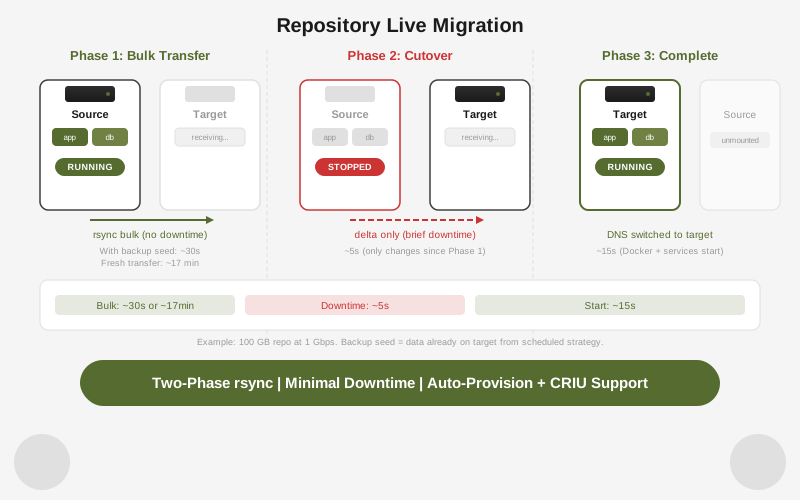
Migreerige repositoorium ühelt masinalt teisele. Ainus seisakuaeg on lõplik deltasünkroonimise faas: tavaliselt sekundeid kuni mõni minut, sõltuvalt kirjutamise kiirusest ülelõikamise ajal.
rdc repo migrate my-app@server-1 --to server-2| Valik | Kirjeldus |
|---|---|
--provision | Ettevalmistage repositoorium sihtmasinal enne migratsiooni (loob LUKS-kujutise ja registreerib konfiguratsiooni) |
--checkpoint | Loo töötavate konteinerite CRIU kontrollpunkt enne ülelõikamist |
--bwlimit <kbps> | Piira rsync-i ribalaiust kilobaitides sekundis |
--skip-dns | Jäta DNS-kirjete uuendamine pärast ülelõikamist vahele |
Kolmefaasiline voog:
- Kuum eelkopeerimine — rsync edastab andmeid, kuni repositoorium jätkab töötamist lähtemasinalt. Suured failid edastatakse enne seisakuaega.
- Ülelõikamine — repositoorium peatatakse lähtemasinalt, viimane rsync-käik sünkroniseerib ülejäänud muudatused ja repositoorium käivitub sihtmasinalt.
- Käivitamine sihtmasinalt — renet ühendab ja käivitab repositooriumi sihtmasinal. DNS uuendatakse, välja arvatud juhul, kui
--skip-dnson antud.
Push vs migrate:
repo push | repo migrate | |
|---|---|---|
| Operatsioon | Kopeerimine | Teisaldamine |
| Allikas pärast | Muutmata | Peatatud |
| Seisakuaeg | Puudub (ainult kopeerimine) | Lühike ülelõikamisaken |
| DNS-i uuendamine | Ei | Jah (välja arvatud --skip-dns) |
| Kasutusjuht | Varundamine, lavastuskloon | Masina asendamine, serveri teisaldamine |
Kärpimine
Pärast repositooriumide kustutamist või ebaõnnestunud operatsioonidest taastumisel võivad jääda orbunud ühendamise kataloogid, lukufailid ja eemaldamatud markerid. Kärpimine eemaldab need turvaliselt:
# Eelvaade, mida eemaldataks
rdc machine prune server-1 --dry-run

# Eemalda orbunud ressursid
rdc machine prune server-1Mõjutatakse ainult ressursse, millel puudub vastav repositooriumi kujutis. Mittetühje ühendamise katalooge ei eemaldata kunagi.