Creating Your First Repository
So, a Rediacc repository is one encrypted file on your server. Mount it and you get a folder with its own Docker daemon and its own application data, sealed off from everything else on the box.
Think of it like a USB drive for production: a file at rest, a server at run.
File on disk, environment when mounted
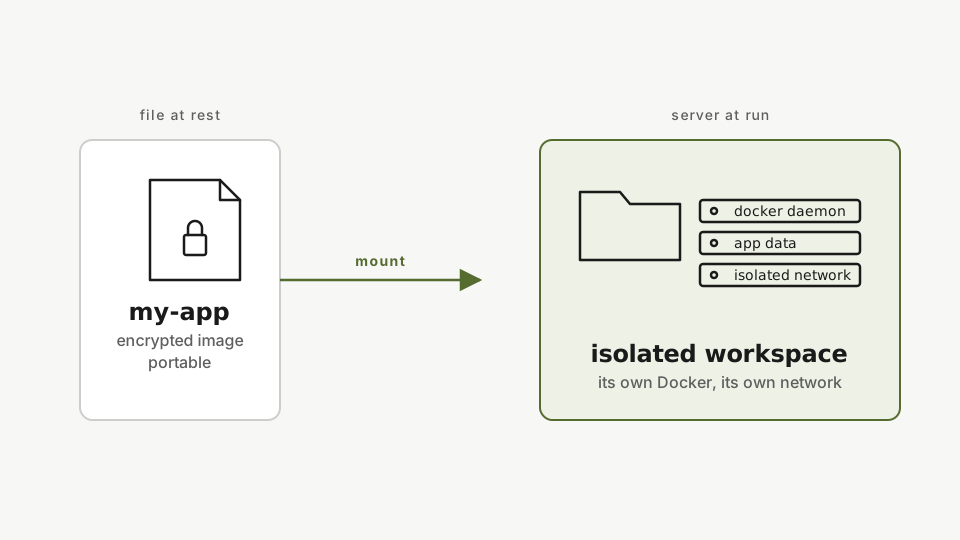
So on disk it’s a single encrypted image. When it mounts, you get:
- A dedicated Docker daemon (separate from the host’s)
- Application data inside the encrypted volume
- Loopback IPs that don’t collide with anything else on the box
Repositories move. Copy one between machines, back it up, or fork it (forks are near-instant and constant-time, a 100 GB repo forks as fast as a 1 GB one). Each repo is sealed off from every other repo on the same server. That isolation is the whole point.
Create one
rdc repo create my-app -m <machine-name> --size 2GCreate a 2 GB encrypted repository on the server. A repo is a single encrypted file at rest. Creating it mounts it right away: a folder with its own Docker daemon and isolated application data.
This creates a 2 GB encrypted repository and mounts it. Verify:
rdc repo list -m <machine-name>Confirm the new repo is registered. Once listed, it can be deployed, forked, backed up, or opened in an editor from your laptop.
Open it in VS Code
rdc vscode connect my-app@<machine-name>Open the repo directly in VS Code with rdc vscode connect. It starts a remote SSH session into the repo so you can edit its files in your editor.
VS Code opens inside the repository over SSH. The workspace starts empty by design. Anything you create here lives inside the encrypted volume and is invisible to every other repo on the box.
Next: Deploying Your First App.