Branching: Commit & Rollback
Version your repositories like code. A commit freezes a fork into an immutable image; a branch names it; checkout turns any commit back into a fresh writable fork. In this tutorial we commit a known-good state, drop a real PostgreSQL table, and get every row back in seconds.
Watch the tutorial
The model
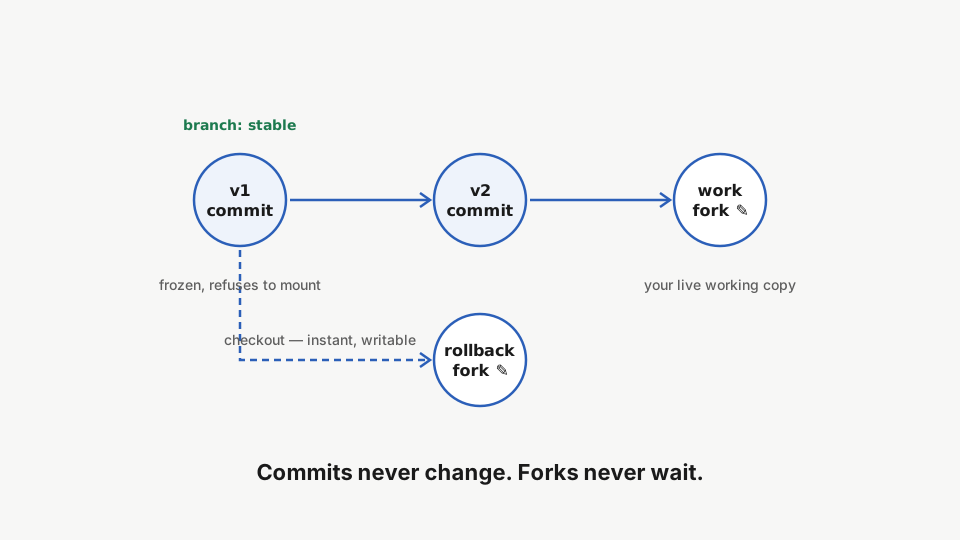
Commits never change: they refuse to even mount. Forks never wait: checkout is a near-instant reflink clone. The full mental model lives in the branching guide.
Make a checkpoint
A marker file makes the version visible, and a real database makes the rollback meaningful: the customers table holds three rows.
rdc term connect --machine <machine-name> --repository app:work --command 'echo v1 > version.txt && cat version.txt'Write version one of your state into the working fork.
rdc term connect --machine <machine-name> --repository app:work --command 'docker exec db psql -U app -d app -c "SELECT count(*) FROM customers"'The fork also runs a real PostgreSQL database: the customers table holds three rows.
rdc repo commit --name app:work --message 'v1 baseline' --machine <machine-name>Commit the working fork: the full repository state, database included, is frozen into an immutable, named snapshot.
rdc repo branch --branch stable --name app:workCreate a branch pointing at the commit — a human name for the frozen state.
The commit captures everything: files and the PostgreSQL data directory. The stable branch now names that frozen state.
Keep working
rdc term connect --machine <machine-name> --repository app:work --command 'echo v2 > version.txt && cat version.txt'Continue working: the fork changes, the committed history stays frozen.
Disaster
A risky change drops the table. Then the query confirms the damage is real.
rdc term connect --machine <machine-name> --repository app:work --command 'docker exec db psql -U app -d app -c "DROP TABLE customers"'The risky change drops the customers table in the working fork.
rdc term connect --machine <machine-name> --repository app:work --command 'docker exec db psql -U app -d app -c "SELECT count(*) FROM customers"'Querying the table now fails: relation "customers" does not exist. The data is really gone from the working fork.
ERROR: relation "customers" does not exist. Three rows, gone. In real life this is the moment your stomach sinks; here it’s the setup for the payoff.
rdc repo commit --name app:work --message 'v2 risky change' --machine <machine-name>Commit the new state as well, dropped table included; the history grows like a git log.
rdc repo log --name app:work --machine <machine-name>Walk the commit history with repo log — messages, authors, parents.
History records what actually happened, broken state included: v2 risky change on top, v1 baseline below it.
Roll back in seconds
rdc repo checkout --ref stable --from app:work --tag rollback --machine <machine-name>Check the stable branch out into a fresh writable fork — near-instant thanks to copy-on-write.
rdc repo up --name app:rollback --machine <machine-name>Bring the rollback fork up — it runs alongside the working fork.
rdc term connect --machine <machine-name> --repository app:rollback --command 'cat version.txt'Read the marker file in the rollback fork: version one, exactly as committed.
rdc term connect --machine <machine-name> --repository app:rollback --command 'docker exec db psql -U app -d app -c "SELECT count(*) FROM customers"'Query the customers table in the rollback fork: three rows, exactly as committed. The rollback restored the database, not just files.
The rollback fork reads v1, and the customers table is back with all three rows. The rollback restored the database, not just files. Nothing was overwritten: the working fork still has version two, and the video opens both in VS Code to prove it.
Next: Live Migration.