Live Migration
Servers get replaced: hardware ages, providers change, regions move. rdc repo migrate moves a running repository to another machine with one command, and with --checkpoint even process memory makes the trip. The demo app, pulse, keeps a counter in RAM; after the move it keeps counting instead of starting over.
Watch the tutorial
How it moves
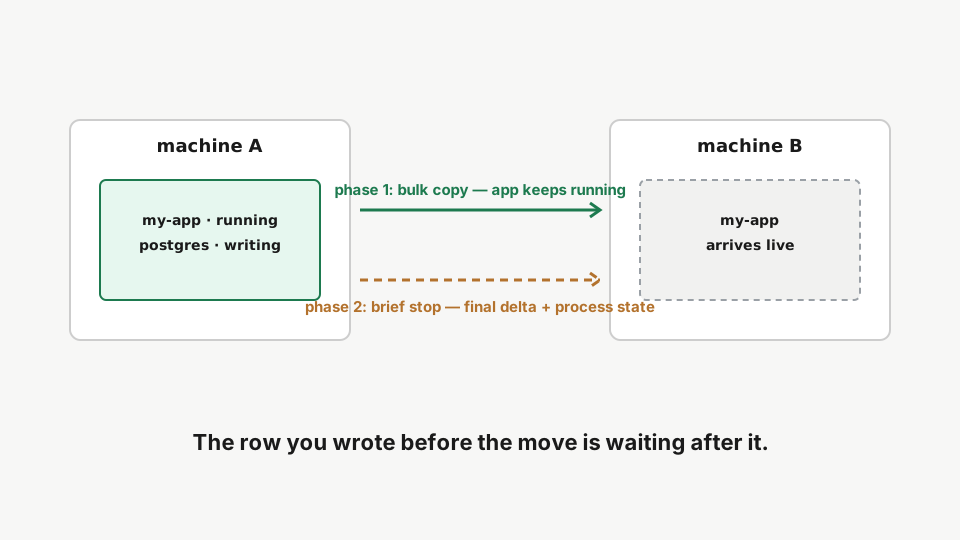
Phase one copies the bulk while the app keeps running. Phase two checkpoints the live processes (CRIU, for containers labeled rediacc.checkpoint=true), carries the final delta plus the process state across, and resumes everything on the new machine. The downtime is the delta, not the data.
Step 1: The evidence, a counter in RAM
rdc term connect --machine <machine-name> --repository pulse --command 'docker logs heartbeat_app --tail 5'The app keeps an in-memory counter and logs a beat every five seconds. The counter lives in RAM only: a process restart would reset it to one.
memory counter=6 and climbing, one beat every five seconds. The counter lives in process memory only. If the process restarted, it would start over at one.
Step 2: Migrate it, live
rdc repo migrate --name pulse --from <machine-name> --to <target-machine> --checkpoint --skip-dnsMigrate with checkpoint: phase one transfers the 2 GB bulk while the source stays online, then a brief cutover checkpoints the running processes and carries the final delta across. The output prints each phase and the actual downtime.
The output narrates the move: phase one transfers the 2 GB bulk while the source stays online, then the cutover line prints the actual DOWNTIME: a few tens of megabytes and roughly twenty seconds, for a two-gigabyte repository.
Step 3: Verify the new home
rdc repo list --machine <target-machine>List repositories on the target machine: pulse is mounted, Docker is running, and its containers are up.
On the target, pulse is mounted, Docker is up, containers running.
Step 4: The source is stopped
rdc repo list --machine <machine-name>On the source the repository is stopped and unmounted: no Docker, zero containers. The image is retained as the base for future delta transfers.
The source still lists the repository, but honestly: not mounted, no Docker, zero containers. Nothing runs there anymore. The image is kept on purpose as the base for the next delta transfer, so a future push back is cheap.
Step 5: The counter kept counting
rdc term connect --machine <target-machine> --repository pulse --command 'docker logs heartbeat_app --tail 5'The logs on the new machine show the counter continuing from where the checkpoint froze it, not resetting to one. Process memory made the trip.
memory counter=17, then 18, 19, 20… It picked up exactly where the checkpoint froze it instead of resetting to one. That’s process memory making the trip; the app never noticed it changed machines.
Without
--checkpoint, migrate still moves disk and containers; they restart fresh on the target instead of resuming mid-flight.
Next: Delta Transfer.